

Loyalty
Loyalty lets your customers pay with points and collect points on what they buy, without you building a separate integration for each programme. It has two halves. Redemption ("burn") spends points as a payment method on the standard intent lifecycle. Earn awards points after a purchase, as an asynchronous call that never blocks your checkout.
Redemption ("burn")
A burn is not a separate product surface. It produces a transaction that appears in your transactions list, fires the usual webhooks (transaction.purchase.successful, intent.processed), and is refunded, reported and investigated exactly like a card payment. The one thing it adds is an authentication step: the loyalty programme sends a one-time password (OTP) to the customer, and the intent waits in an OTP state until that code is submitted. Most of this page is about driving that state correctly.
Choose where the OTP is collected
You have two ways to run a burn, and they are genuinely different integrations - not two names for the same work.
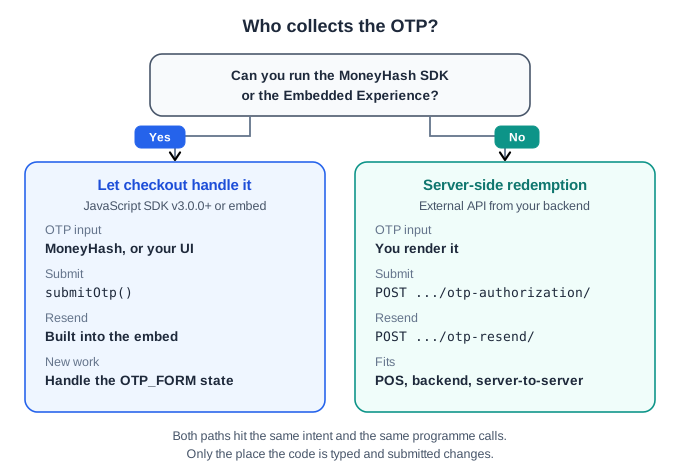
| Let checkout handle it | Render the OTP yourself | |
|---|---|---|
| You use | The Embedded Experience, or the MoneyHash JavaScript SDK (v3.0.0+) | The External API |
| Who renders the OTP input | MoneyHash, or your UI from the SDK state | You |
| Who submits the OTP | The embed, or the SDK with submitOtp() | Your backend, with POST .../otp-authorization/ |
| Resend | Handled for you | Your backend, with POST .../otp-resend/ |
| Use it when | You already render MoneyHash checkout and want loyalty to appear as another method | You cannot run the SDK - a backend microservice, a POS, or a server-to-server integration |
If you use the Embedded Experience, there is nothing on this page you have to implement for the OTP. Create the intent with the loyalty method and the customer's mobile number, put checkout on the page, and the embed collects the code, runs the countdown and offers the resend.
If you use the JavaScript SDK, handle the OTP_FORM state and pass the code to submitOtp():
if (intentDetails.state === "OTP_FORM") {
  const { otpLength, intentOtpData } = intentDetails.stateDetails;
  // Render an input sized to otpLength, then:
  await moneyHash.submitOtp({
    intentId,
    otp: "<CODE_THE_CUSTOMER_ENTERED>",
    intentOtpData,
  });
}
The rest of this page documents the third path: the External API, where you render and submit the OTP yourself.
Start a redemption
There is no separate "burn" endpoint. You start a redemption by creating an External API intent with the loyalty method already selected and the customer's mobile number attached - the same create call you already use, with two extra fields.
{
  "amount": 50,
  "amount_currency": "SAR",
  "operation": "purchase",
  "payment_method": "<LOYALTY_METHOD>",
  "billing_data": {
    "mobile_wallet_number": "+966500000000"
  },
  "webhook_url": "https://merchant.example.com/webhooks/moneyhash"
}| Field | Why it matters |
|---|---|
payment_method | The loyalty method to redeem against. This is what makes the intent a burn rather than an ordinary payment, and it skips method selection. The code differs per programme. |
billing_data.mobile_wallet_number | The customer's mobile number in E.164 format - see Identify the customer. |
amount_currency | Must be a currency the programme supports - see Currency. |
With the method and the mobile number both present, the External API create call can return the OTP state directly in its response. Because the method is already chosen, the intent skips METHOD_SELECTION entirely - there is no update-method call to make. For the rest of the External API state model, see External API.
The OTP intent state
Once the redemption starts, the intent reports an OTP state and the transaction waits for authentication. That payload is the contract for your OTP screen.
{
  "state": "OTP_FORM",
  "state_details": {
    "otp_length": 4,
    "expires_after_seconds": 180,
    "previous_submission_status": null
  }
}| Field | Meaning |
|---|---|
otp_length | How many digits the code has. Size your input to this value. |
expires_after_seconds | How long the code is valid. Drive your countdown and your resend button from this. |
previous_submission_status | null on the first prompt. On a retry prompt, a unified OTP error code - see Retry after a bad code. |
Not every loyalty method reports the External state: "OTP_FORM". Some return the older shape, next_action: "OTP_FORM" with the OTP details in action_data.
Branch on either - if you only check state, your checkout will miss the OTP step entirely on some programmes.
These values differ by loyalty programme, and a programme can change them without a MoneyHash release. An integration that hard-codes "6 digits, 5 minutes" will silently reject valid codes the day it is pointed at a different programme, and every one of those redemptions fails.
This is the single most important rule on this page: your OTP screen is rendered from the state payload, not from constants in your code.
The redemption flow
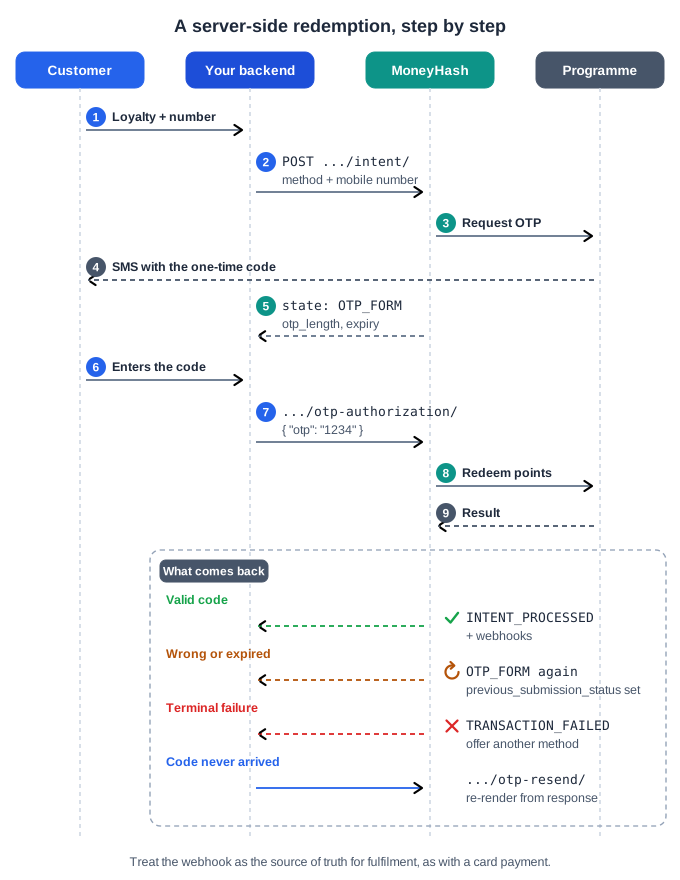
From the customer choosing loyalty to the confirmation screen, a server-side burn is: create the intent, read the OTP state, submit the code - plus an optional resend.
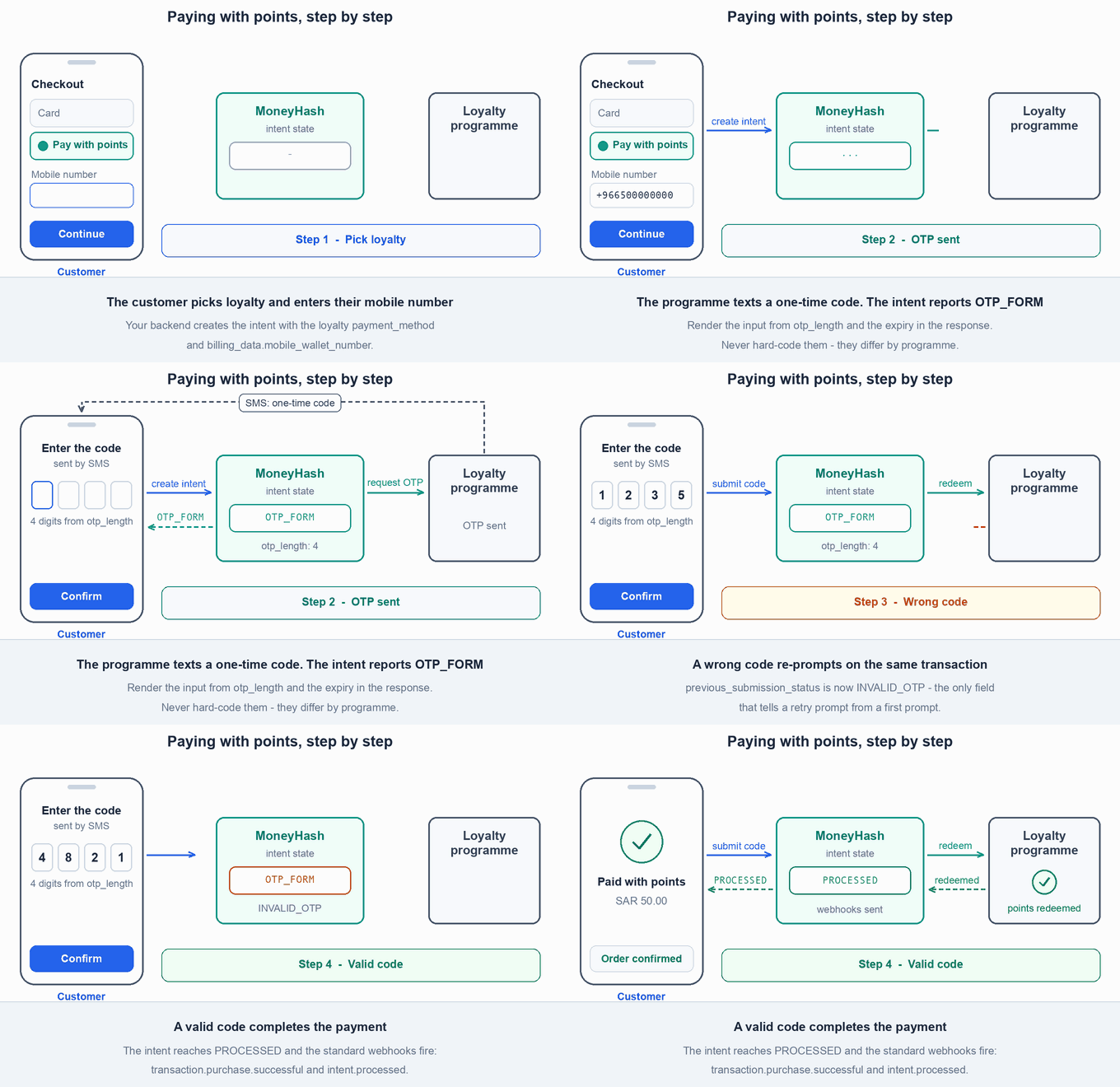
Here is the same flow in motion, including the path most integrations forget to build - a wrong code that re-prompts on the same transaction.
Identify the customer
A redemption is keyed on the customer's mobile number - not the card, and not your own customer ID. Whatever identity you hold for the customer elsewhere, a burn needs a mobile number that is registered with the loyalty programme.
+
Burn, earn and the eligibility check all take the same international format, for example "+966500000000". Store one shape and reuse it - a number sent without the + is likely to fail validation.
Some programmes rewrite the number internally to a national format. That happens on MoneyHash's side and is not part of the contract you send.
{
  "billing_data": {
    "mobile_wallet_number": "+966500000000"
  }
}
{
"loyalty": {
"provider_id": "<LOYALTY_CONNECTION_ID>",
"identifier": "+966500000000",
"identifier_type": "PHONE_NUMBER"
}
}Earn and eligibility are not limited to phone numbers. identifier_type accepts PHONE_NUMBER, NATIONAL_ID or EMAIL, and each programme expects one of them. With the JavaScript SDK, getLoyaltyProviders() returns each connected programme's id, name and identifierType, so your UI can ask for the right thing.
A number that is not enrolled in the programme is a normal, expected case, not an edge case. There is no pre-check for redemption - enrolment is discovered when the OTP is requested or the code is submitted. Design the checkout so the customer can correct the number or fall back to another payment method without losing the intent.
Submit the OTP
Send the code the customer entered.
{
  "otp": "1234"
}
If you are on the Embedded Experience or the JavaScript SDK, you do not call this - checkout collects and submits the code for you.
On a valid OTP, the programme executes the redemption, the transaction moves to SUCCESSFUL, the intent reaches PROCESSED, and the standard webhooks fire:
transaction.purchase.successfulintent.processed
Treat the webhook as the source of truth for fulfilment, exactly as you would for a card payment.
On an invalid OTP, the transaction stays pending, the intent stays unprocessed, and the OTP state is returned again - see below.
Retry after a bad code
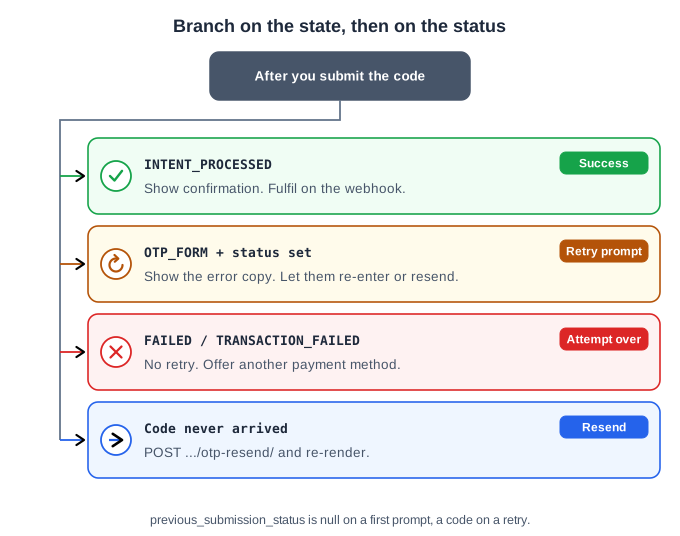
Every response after a submission lands in one of four places. Branch on the state first, then on previous_submission_status.
A wrong code does not end the redemption. The OTP state comes back on the same intent and transaction, with previous_submission_status populated, and the customer can try again:
{
  "state": "OTP_FORM",
  "state_details": {
    "otp_length": 4,
    "expires_after_seconds": 180,
    "previous_submission_status": "INVALID_OTP"
  }
}
previous_submission_status is the only reliable way to tell a retry prompt from a first prompt - the rest of the payload looks identical. If you branch on anything else, your UI shows a blank OTP screen instead of an error message.
When the redemption fails outright
A wrong code re-prompts. Other problems - most often a number that isn't valid for that programme - end the attempt instead. The HTTP response is still 200, so you must branch on the body: state: "TRANSACTION_FAILED" on the External API, or next_action: "FAILED" on the older shape.
There is no retry on this path. The attempt is over, and the operation's latest_status carries the reason. An OTP state means prompt again; a failed state means show the failure and offer another payment method. A checkout that only handles the OTP state hangs on a blank screen whenever this happens.
MoneyHash normalises each programme's error into one taxonomy, so you write one set of error copy regardless of which programme the customer chose:
previous_submission_status | What to tell the customer |
|---|---|
INVALID_OTP | The code was wrong. Let them re-enter it. |
OTP_EXPIRED | The code timed out. Offer a resend. |
OTP_ALREADY_USED | The code was submitted before. Offer a resend. |
OTP_STILL_VALID | Returned on a resend request while the previous code is still valid. Don't resend - let them use the code they have. |
OTP_GENERIC_FAILURE | The programme failed for an unspecified reason. Offer a retry, and a fallback method. |
These OTP codes are distinct from MoneyHash payment and payout status codes. Do not map them onto your existing payment error handling.
Request a resend
When the customer says the code never arrived, or it expired, request a fresh one, with an empty body:
curl -X POST https://web.moneyhash.io/api/v1.4/external/payments/intents/<INTENT_ID>/otp-resend/ \
  -H "x-api-key: <YOUR_API_KEY>" \
  -H "Content-Type: application/json" \
  -d '{}'
import requests
response = requests.post(
f"https://web.moneyhash.io/api/v1.4/external/payments/intents/{intent_id}/otp-resend/",
headers={"x-api-key": "<YOUR_API_KEY>"},
json={},
)const res = await fetch(
`https://web.moneyhash.io/api/v1.4/external/payments/intents/${intentId}/otp-resend/`,
{
method: "POST",
headers: {
"x-api-key": "<YOUR_API_KEY>",
"Content-Type": "application/json",
},
body: "{}",
},
);The response is the full intent response, so re-render your OTP screen from it exactly as you did the first time - re-reading the OTP length and expiry, neither of which the new code is obliged to match.
Some loyalty methods have no resend at all. Do not render the button unconditionally - show it only when the OTP state tells you a resend is available for that transaction, and note that the first prompt may report no retry until a retryable OTP error has occurred.
Gate the button on a timer derived from the OTP expiry rather than offering it immediately, and handle a 400 by offering a fallback payment method rather than looping.
Earn: award points after a payment
Earn is the other half of loyalty, and its contract is short but easy to get wrong: it is asynchronous. The payment is already done by the time points are involved, so nothing in your checkout should wait on an earn.
There are two ways to earn, and they behave differently - the difference matters more than it looks:
| Attached to a payment | Standalone earn | |
|---|---|---|
| How | Send loyalty / loyaltyData when the customer pays - via the SDK, or on the pay / update-method APIs | POST /api/v1.4/loyalty/earn/ from your backend |
| Response | None of its own. The payment succeeds as usual; the earn is queued in the background | 202 Accepted with a PENDING earn record |
| Webhooks | None. No loyalty.earn.* events are sent | loyalty.earn.earned / loyalty.earn.failed, if you set webhook_url |
| How to reconcile | The result is stored on that transaction's provider activities | Use the returned earn id |
| Reversal | Follows that payment's refund or void, automatically | You call the reverse endpoint yourself |
| Use it when | The purchase went through MoneyHash checkout | The purchase did not go through MoneyHash, or you earn server-side |
If you attach the earn to a payment, do not wait on a loyalty.earn.* event - none will arrive. Those events exist only for the standalone earn API.
The standalone earn call
{
  "amount": "150.00",
  "currency": "SAR",
  "loyalty": {
    "provider_id": "<LOYALTY_CONNECTION_ID>",
    "identifier": "+966500000000",
    "identifier_type": "PHONE_NUMBER"
  },
  "merchant_reference": "ORDER-2026-05-12-00481",
  "webhook_url": "https://merchant.example.com/webhooks/moneyhash"
}
{
"status": { "code": 202, "message": "success", "errors": [] },
"data": {
"id": "<EARN_ID>",
"status": "PENDING",
"provider_id": "<LOYALTY_CONNECTION_ID>",
"amount": "150.00",
"currency": "SAR",
"merchant_reference": "ORDER-2026-05-12-00481",
"created": "2026-05-12T14:32:11Z"
},
"count": 1,
"next": null,
"previous": null
}amount, currency, loyalty and merchant_reference are required; webhook_url is optional. Full schema: Create loyalty earn.
The result arrives as a webhook - loyalty.earn.earned or loyalty.earn.failed, carrying provider_reference_id and failure_reason. You can also read the current state at any time with GET /api/v1.4/loyalty/earn/{id}/ (Retrieve loyalty earn).
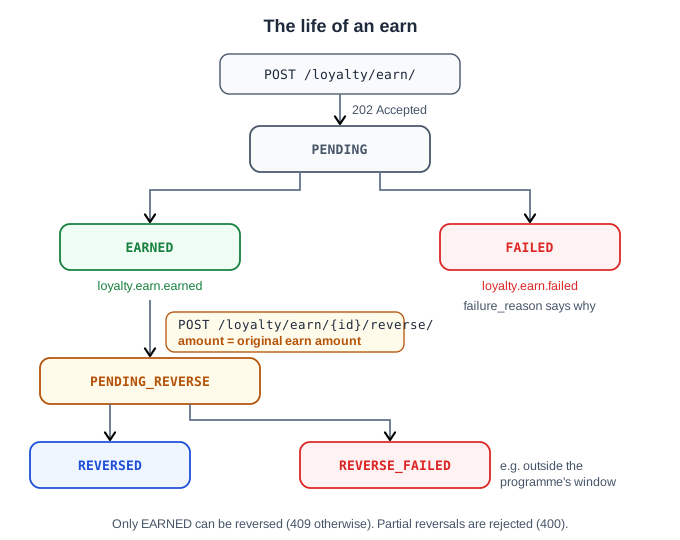
| Status | Webhook | Meaning |
|---|---|---|
PENDING | - | Accepted and queued. The programme has not confirmed yet. |
EARNED | loyalty.earn.earned | The programme credited the points. provider_reference_id carries its reference. |
FAILED | loyalty.earn.failed | The programme rejected the earn. failure_reason says why. |
PENDING_REVERSE | - | You asked for a reversal and MoneyHash is calling the programme. |
REVERSED | loyalty.earn.reversed | The points were taken back. reversed_at and reverse_provider_reference_id are set. |
REVERSE_FAILED | loyalty.earn.reverse_failed | The programme refused the reversal - for example, outside its reversal window. |
merchant_reference is a label, not an idempotency key
It is not unique and it does not deduplicate. Calling POST /loyalty/earn/ twice for the same order creates two earns and grants the points twice.
Treat every call as a new earn. Deduplicate in your own system before calling, store the returned id, and use that id for retrieve and reverse.
What your integration should wait on: nothing. Do not block checkout, order confirmation, or the customer's success screen on the earn result.
amount is the loyalty-eligible amount
It is not a payment amount - no money moves through this call. It is the figure the programme calculates points against, normally your order total.
Check eligibility before an earn
Some programmes let you ask whether a customer identifier is enrolled before you send an earn. Most do not - today only one of the connected programmes answers, and the rest return eligible: null. Treat the check as an optimisation for your UI, never as a gate.
A true here does not mean the customer can redeem. There is no pre-check for burn: enrolment is discovered when the OTP is requested or the code is submitted.
curl -X POST https://web.moneyhash.io/api/v1.4/loyalty/eligibility/ \
  -H "x-api-key: <YOUR_API_KEY>" \
  -H "Content-Type: application/json" \
  -d '{
    "provider_id": "<LOYALTY_CONNECTION_ID>",
    "identifier": "+966500000000",
    "identifier_type": "PHONE_NUMBER"
  }'
import requests
response = requests.post(
"https://web.moneyhash.io/api/v1.4/loyalty/eligibility/",
headers={"x-api-key": "<YOUR_API_KEY>"},
json={
"provider_id": "<LOYALTY_CONNECTION_ID>",
"identifier": "+966500000000",
"identifier_type": "PHONE_NUMBER",
},
)const res = await fetch("https://web.moneyhash.io/api/v1.4/loyalty/eligibility/", {
method: "POST",
headers: {
"x-api-key": "<YOUR_API_KEY>",
"Content-Type": "application/json",
},
body: JSON.stringify({
provider_id: "<LOYALTY_CONNECTION_ID>",
identifier: "+966500000000",
identifier_type: "PHONE_NUMBER",
}),
});Three outcomes, and they mean three different things:
{
  "status": { "code": 200, "message": "success", "errors": [] },
  "data": { "eligible": true },
  "count": 1,
  "next": null,
  "previous": null
}
{
"status": { "code": 200, "message": "success", "errors": [] },
"data": { "eligible": false, "reason": "customer_not_registered" },
"count": 1,
"next": null,
"previous": null
}{
"status": { "code": 200, "message": "success", "errors": [] },
"data": { "eligible": null, "reason": "This provider does not support eligibility check." },
"count": 1,
"next": null,
"previous": null
}| Response | What it means | What to do |
|---|---|---|
200 + eligible: true / false | The programme answered | Use it in your UI |
200 + eligible: null | This programme has no eligibility API | Skip the check and continue |
400 | Your request was wrong - bad identifier format, unknown provider_id, or the programme's check errored | Fix the payload or the connection. Do not treat it as "unsupported" |
A 400 is not a quiet "unknown". Treating it as one hides real integration mistakes. Full schema: Check loyalty eligibility.
Refunds and reversals
How points come back depends on which half of loyalty you are undoing - and in every case, reversal is full or nothing. Loyalty does not support partial reversal today.
| What happens | Effect on points |
|---|---|
| A redemption (burn) is fully refunded | The redeemed points are returned to the customer. Refund it as you would any payment. |
| A redemption is partially refunded | Not supported on current loyalty methods. |
| A payment with an attached earn is refunded or voided | All earned points are reversed - even on a partial refund, because loyalty cannot claw back a matching portion. |
| A burn fails or times out after the points were taken | MoneyHash may reverse the redemption automatically. This applies to specific programme errors and is not a guarantee for every method. |
| You need to take back points from a standalone earn | Call the reverse endpoint below. A standalone earn is its own record, not linked to a payment, so a refund cannot reverse it. |
{
  "amount": "150.00"
}
The rules are strict:
amountmust equal the original earn amount - a partial reversal is rejected with400.- The earn must be in
EARNED. Reversing anything else returns409. - The call is asynchronous. The status moves to
PENDING_REVERSE, thenREVERSEDorREVERSE_FAILED.
Full schema: Reverse loyalty earn.
Windows are set by the loyalty programme, not by MoneyHash, and a programme can refuse a reversal outright. A refund or reversal issued long after the original purchase can fall outside the window - you will see it fail (REVERSE_FAILED for an earn) rather than silently succeed.
Currency
Each loyalty programme decides which currencies it accepts, and the programmes available today operate in SAR. An intent in a currency the programme does not support will not offer its loyalty method, and an earn call in one is rejected at validation with a 400 such as "Currency USD is not supported by this provider."
Common errors and troubleshooting
No loyalty method appears on the intent +
Redemption is rejected immediately, before any OTP +
+, re-prompt for the number, or fall back to another payment method. There is no pre-check for redemption, so this is where an unenrolled number surfaces.The checkout never shows an OTP screen +
state: "OTP_FORM". Some loyalty methods return the older shape instead - next_action: "OTP_FORM" with the details in action_data. Handle both.A valid code is rejected by your own UI before submission +
otp_length from the OTP state - or otpLength in the JavaScript SDK - and size the input from that.
OTP_EXPIRED returned
+
/otp-resend/, and drive your countdown from expires_after_seconds rather than a fixed timer.The retry prompt shows no error message, or the checkout hangs after a bad code +
previous_submission_status - null means first prompt, anything else means a retry. For a hang: you are not handling the failed state (state: "TRANSACTION_FAILED" or next_action: "FAILED"), which some programmes return instead of re-prompting.
The resend button does nothing, or returns 400
+
400 by offering a fallback payment method rather than looping.
OTP_GENERIC_FAILURE, or no response from the programme
+
An earn shows PENDING and never changes in your system
+
loyalty.earn.* webhook at all. For a standalone earn, consume loyalty.earn.earned / loyalty.earn.failed and reconcile with GET /loyalty/earn/{id}/.Your webhook handler never fires for earns +
loyalty.earn.earned - there is no loyalty.earn.successful. Also confirm you passed webhook_url on the earn call, and that the earn was standalone rather than attached to a payment.Points granted twice for one order +
merchant_reference is a label, not an idempotency key - it does not deduplicate, and a retried call creates a second earn. Deduplicate in your own system before calling, and track the returned earn id.
400 or 409 when reversing an earn
+
400: the reverse amount is not equal to the original earn amount - partial reversals are not supported. 409: the earn is not in EARNED (it is still pending, already reversed, or failed).Related
- External API - the full state model the redemption flow runs on.
- Customers - attaching a customer record to the intents you create.
- Check loyalty eligibility, Create loyalty earn, Retrieve loyalty earn, Reverse loyalty earn - API reference.
Updated 15 days ago