

Customers
A Customer is the identity your payments hang off. It's a persistent record for one person or business in your MoneyHash organization, and it's what links saved cards, wallet balance, transaction history, billing data and subscriptions to a single stable reference.
Without one, every checkout is stateless - nothing is remembered between payments. With one, all of it becomes available by attaching a single customer field to your payment intents.
Why it matters
A guest checkout is a transaction. A customer is a relationship. The difference isn't cosmetic - it decides whether your customer types their card in again, and whether you can answer "what has this person paid us?" at all.
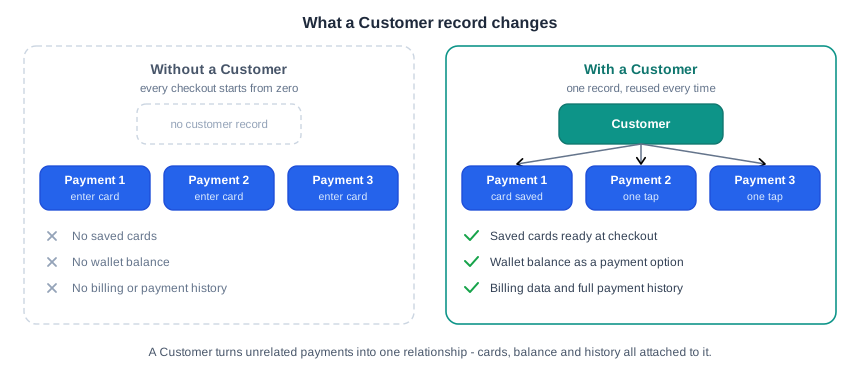
Nothing on the right-hand side needs extra integration work. The record and the reference are the whole mechanism.
What a Customer unlocks
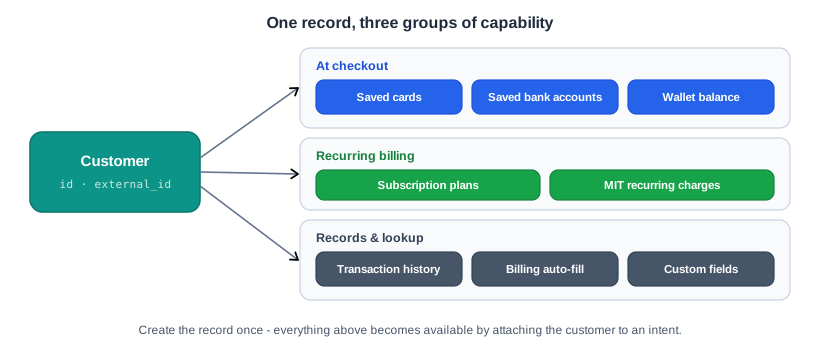
| Capability | What it enables |
|---|---|
| Saved cards | Tokenize a card during or before a payment, then offer it back for one-tap checkouts. |
| Saved bank accounts | The same for tokenized bank accounts - surfaced alongside saved cards. |
| Wallet balance | Every customer gets a wallet on creation. Use it for top-ups, refunds and balance-funded checkout. |
| Billing auto-fill | Billing details on the profile are passed to the provider on every intent - no re-collection. |
| Transaction history | Every intent carrying the customer's ID is recorded against them, automatically. |
| Subscriptions | The customer is the billing anchor for subscription plans and merchant-initiated (MIT) recurring charges. |
| Custom fields | Attach your own key-value metadata, then filter your customer list by it. |
The lifecycle
Three stages, and only the middle one repeats:
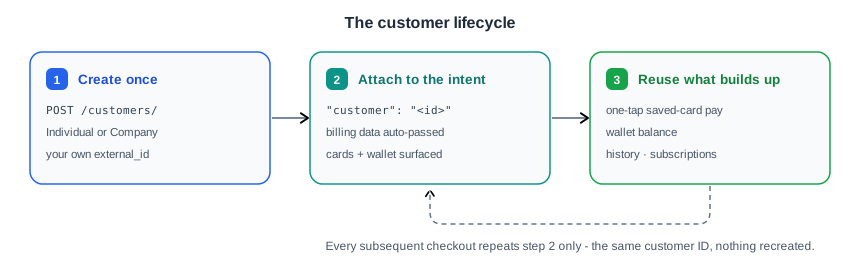
Step 1 - Create the record once
MoneyHash has two customer types, and the choice only affects which fields are required at creation:
- Individual - a single person. Your consumer or end user.
- Company - a business entity, for B2B contexts where payments belong to an organization rather than a person and tax identification matters.
Everything else on this page behaves identically for both. The wallet is provisioned automatically as part of creation - there's no second call.
Set your own external_id at creation. It makes creation idempotent: if you create a customer with an external_id that already exists, MoneyHash returns the existing record instead of a duplicate. That single habit removes the "did I already create this customer?" branch from your code, and it gives you a lookup key you already own.
See Create customer for the full field list, the required-vs-optional rules per type, and the response schema.
Step 2 - Attach the customer to the intent
This is the hinge. Everything else on this page keys off one field on the payment intent:
{
  "amount": 250,
  "amount_currency": "SAR",
  "operation": "purchase",
  "webhook_url": "https://example.com/moneyhash/webhook",
  "customer": "<CUSTOMER_ID>"
}
What changes when customer is present:
| Condition | Outcome |
|---|---|
customer present | Billing data from the profile is passed to the provider |
customer present, and the customer has saved cards | Saved cards are offered as payment options |
customer present, and the customer has wallet balance | Wallet balance is offered as a payment option |
customer present + save_card: true + payment succeeds | The card is tokenized and linked to the customer |
customer absent | None of the above - no saved cards, no billing auto-fill, no wallet |
You can also pass the customer straight to the SDK when you fetch payment methods, and the response tells you exactly what that identity brought with it:
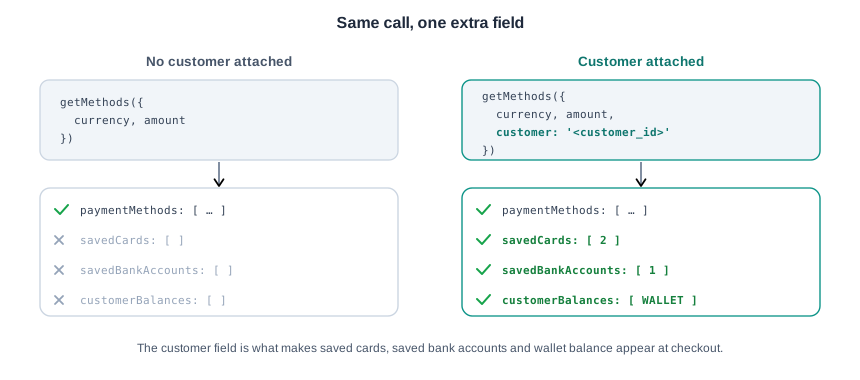
savedCards, savedBankAccounts and customerBalances are the same arrays you already render in your checkout - attaching a customer is what fills them. See SDK Architecture for the full getMethods contract and how to proceed with the method the customer picks.
The wallet arrives as customerBalances with the id SELFSERVE_WALLET. Treat it as a payment option like any other, not as a special case.
Step 3 - Reuse what accumulates
By the second checkout there's nothing left to build. The saved card is in savedCards, the balance is in customerBalances, and the history is queryable. Step 2 is the only step that repeats - the record itself is created once and never again.
Finding a customer again
Two ways, and the second is the one worth designing around:
- By MoneyHash ID
GET /api/v1.4/customers/{id}/
- By your own ID
GET /api/v1.4/customers/?external_id=
If you set external_id at creation, you never have to store or reconcile MoneyHash IDs. Your own user ID is the lookup key, in both directions.
Custom fields give you a third axis. Values can be string, int, float or boolean, and they're filterable on the list endpoint using custom_fields__{key}={value}:
GET /api/v1.4/customers/?custom_fields__loyalty_tier=gold
GET /api/v1.4/customers/?custom_fields__loyalty_tier=gold&custom_fields__is_verified=true
Filters chain as ordinary query parameters. Use them for the attributes you'd otherwise keep in a side table - loyalty tier, account age, internal flags.
The API, at a glance
The reference is the source of truth for fields, types, validation and status codes. This page covers what each endpoint is for; follow the links for how to call it.
| What you want to do | Endpoint | Reference |
|---|---|---|
| Create a customer | POST /customers/ | Create customer |
| Update a customer | PATCH /customers/{id}/ | Update customer |
| Get one customer | GET /customers/{id}/ | Get customer |
| List / search / filter customers | GET /customers/ | List customers |
| Delete a customer | DELETE /customers/{id}/ | Delete customer |
| List a customer's saved cards | GET /customers/{id}/cards/ | List cards |
| Remove a saved card | DELETE /customers/{id}/cards/{card_token_id}/ | Delete card |
| List a customer's transactions | GET /customers/{id}/transactions/ | List transactions |
| List a customer's subscriptions | GET /customers/{id}/subscriptions/ | List subscriptions |
Debit the customers wallet | POST /customers/{customer_uuid}/wallets/debit/ | Debit wallet |
| Attach a customer to a payment | POST /payments/intent/ | Create payment intent |
All of these live under the Customer section of the API Reference. Authentication, the response envelope, pagination and idempotency work exactly as they do everywhere else - see Programmatic Access.
Handling
- Always send
external_id. It's optional and it's the single highest-leverage field on the record - idempotent creation and ID-free lookups, for one string you already have. - Attaching the customer is not optional for saved cards.
save_card: trueon an intent with nocustomerhas nowhere to put the token. The two fields go together. - A saved card belongs to the customer, not to a payment. Deleting a card is an account-settings action, independent of any intent - build "manage payment methods" against the cards endpoints, not against transaction history.
- Don't collect billing data twice. If it's on the profile, it's already going to the provider. Re-asking at checkout is friction you've already paid to remove.
- Update, don't recreate.
PATCHcovers name, contact, billing and custom fields. Creating a second record to change a detail orphans the first one's cards, balance and history. - Check deletion semantics before you wire up a "delete my account" flow. What happens to linked transactions, saved cards and subscriptions is documented on Delete customer - read it there rather than assuming a cascade.
- Customers are org-level, not account-level. One customer record is visible across all the accounts in your organization - see Organizations & Accounts for the full scoping model.
Where to go next
- Create a Payment - the intent this page attaches a customer to.
- Tokenize Cards - how a card becomes a saved card in the first place.
- Wallets - topping up, debiting, and checking out against a balance.
- Manage Subscriptions - plans and recurring billing anchored to a customer.
- SDK Architecture -
getMethods, saved cards, and proceeding with the customer's choice. - Programmatic Access - auth, envelope, pagination, idempotency.
Updated about 2 months ago