

Installment Plans
Installment Plans let customers split a payment into multiple monthly installments. The available plans are determined by the card used, the payment provider configured on the account, and the installment terms that provider supports. Plans are retrieved through the SDK and presented to the customer before the payment is submitted. This page covers both retrieval routes on every platform - Web (JavaScript), iOS, Android, Flutter, and React Native.
How it works
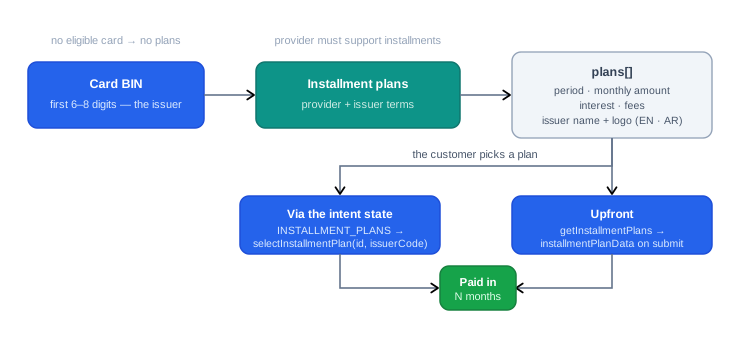
Installments are card-driven: the first 6-8 digits identify the issuer, and the issuer's agreement with your payment provider decides which plans exist - the period, the interest, the fees. Your code never computes any of this; it fetches the plans, renders them, and reports the customer's pick.
There are two ways to retrieve the plans:
- Via the intent state - when the customer enters an eligible card during checkout, the intent transitions to the
INSTALLMENT_PLANSstate with the plans in its payload. The customer selects one, and you callselectInstallmentPlanto proceed. - Without an intent - retrieve plans upfront with
getInstallmentPlans, using the first 6-8 digits, the amount, and the currency. Useful for showing installment options before the customer commits to a payment; the pick is then attached to the payment submission asinstallmentPlanData.
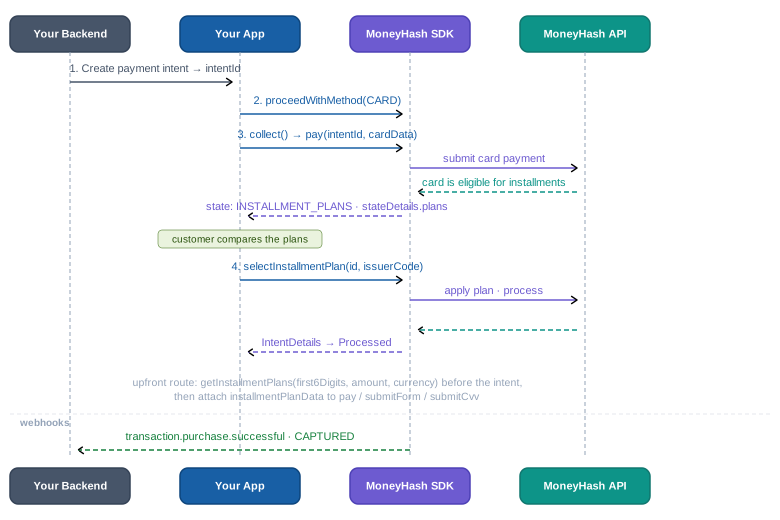
The intent-state route, in sequence:
Prerequisites
- The payment provider connected to your account must support installment plans
- The provider must be configured with installment plans enabled for your merchant account
- Installment plans are tied to the card entered - plans are returned based on the card's issuer
Plan object reference
Each plan in the plans[] array includes the following fields (same shape on every platform - the mobile InstallmentPlan model mirrors these names):
| Field | Type | Description |
|---|---|---|
id | string | Unique plan identifier - required when selecting a plan |
installmentPeriod | number | Number of monthly installments - e.g. 3, 6, 12 |
amount | object | Monthly installment amount - includes value, formatted, currency |
interestRate | number | null | Annual interest rate applied to the plan. null if interest-free |
upfrontFees | string | null | Upfront fees charged at time of payment. null if none |
feeDisplayValue | string | Display-friendly fee value to show the customer |
processingFeesType | string | Fee calculation type - e.g. Fixed or Percentage |
processingFeesAmount | string | number | Processing fee amount |
issuerCode | string | Bank issuer code - required when selecting a plan if present |
issuerNameEn | string | Issuer bank name in English - e.g. Emirates NBD UAE |
issuerNameAr | string | Issuer bank name in Arabic |
issuerLogoEn | string | URL to the issuer's logo (English variant) |
issuerLogoAr | string | URL to the issuer's logo (Arabic variant) |
Example plan object:
{
  "id": "<PLAN_ID>",
  "installmentPeriod": 3,
  "amount": {
    "value": "1984.93 AED",
    "formatted": 1984.93,
    "currency": "AED"
  },
  "interestRate": null,
  "upfrontFees": null,
  "feeDisplayValue": "100",
  "processingFeesType": "Fixed",
  "processingFeesAmount": "0",
  "issuerCode": "<ISSUER_CODE>",
  "issuerNameEn": "Emirates NBD UAE",
  "issuerNameAr": "بنك الإمارات دبي الوطني",
  "issuerLogoEn": "https://sbstatic.payfort.com/frontend/files/logos/issuer/logo_en_162.png",
  "issuerLogoAr": "https://sbstatic.payfort.com/frontend/files/logos/issuer/logo_ar_162.png"
}
Approach 1 - Via the intent state
When a customer enters an eligible card, the intent transitions to the INSTALLMENT_PLANS state (InstallmentPlans on mobile). Read the plans from the state payload and render them in your UI.
Step 1 - Detect the installment plans state
// intent details returned by the SDK
{
  "state": "INSTALLMENT_PLANS",
  "stateDetails": {
    "plans": [
      {
        "id": "<PLAN_ID>",
        "installmentPeriod": 3,
        "amount": { "value": "1984.93 AED", "formatted": 1984.93, "currency": "AED" },
        "interestRate": null,
        "upfrontFees": null,
        "feeDisplayValue": "100",
        "processingFeesType": "Fixed",
        "processingFeesAmount": "0",
        "issuerCode": "<ISSUER_CODE>",
        "issuerNameEn": "Emirates NBD UAE",
        "issuerLogoEn": "https://..."
      }
    ]
  }
}
On mobile, this is the InstallmentPlans case of the intent state, carrying plans - see the state machine in SDK Architecture.
Step 2 - Render the plans to the customer
Use the plan fields to build your installment selection UI. Display installmentPeriod, amount.formatted, interestRate, and feeDisplayValue to help the customer compare options, and issuerLogoEn / issuerLogoAr for the issuing bank's logo.
Step 3 - Select a plan and proceed
Once the customer selects a plan, call selectInstallmentPlan with the plan's id - and its issuerCode when present.
const intentDetails = await moneyHash.selectInstallmentPlan({
  intentId: "<intent-id>",
  planId: "<plan-id>",
  issuerCode: "<issuer-code>", // pass if returned in the plan object
});
let intentDetails = try await moneyHash.selectInstallmentPlan(
intentId: "<intent-id>",
installmentPlanData: InstallmentPlanData(
id: "<plan-id>",
issuerCode: "<issuer-code>" // pass if returned in the plan object
)
)val intentDetails = moneyHash.selectInstallmentPlan(
intentId = "<intent-id>",
installmentPlanData = InstallmentPlanData(
id = "<plan-id>",
issuerCode = "<issuer-code>" // pass if returned in the plan object
)
)final intentDetails = await moneyHash.selectInstallmentPlan(
"<intent-id>",
InstallmentPlanData(
id: "<plan-id>",
issuerCode: "<issuer-code>", // pass if returned in the plan object
),
);const intentDetails = await moneyHash.selectInstallmentPlan({
intentId: "<intent-id>",
installmentPlanData: {
id: "<plan-id>",
issuerCode: "<issuer-code>", // pass if returned in the plan object
},
});Naming differs slightly: the JavaScript SDK takes planId directly, while the mobile SDKs wrap the same value as InstallmentPlanData.id.
Approach 2 - Without an intent
Retrieve plans upfront, before creating an intent. This requires the first 6-8 digits of the card, the payment amount, and the currency - and the account must have a default payment provider that supports installment plans.
Step 1 - Get the plans upfront
const plans = await moneyHash.getInstallmentPlans({
  first6Digits: "411111",
  amount: "1000",
  currency: "AED",
});
let plans = try await moneyHash.getInstallmentPlans(
amount: 1000,
currency: "AED",
first6Digits: "411111"
)val plans = moneyHash.getInstallmentPlans(
amount = 1000.0,
currency = "AED",
first6Digits = "411111"
)final plans = await moneyHash.getInstallmentPlans(
1000, // amount
"AED", // currency
"411111", // first6Digits
);const plans = await moneyHash.getInstallmentPlans({
amount: 1000,
currency: "AED",
first6Digits: "411111",
});The 6–8 digits are already in your hands if you built a custom card form: the card number field's change event reports the length, and the brand event carries first6Digits / first8Digits - fetch the plans the moment they arrive.
Step 2 - Attach the plan to the payment
Once the customer picks a plan, pass it when submitting the payment. Every submission path accepts the plan - cardForm.pay for card payments, submitForm for form-based methods, and submitCardCVV for saved cards - the same three ways on every platform:
const installmentPlanData = {
  planId: "<plan-id>",
  issuerCode: "<issuer-code>", // pass if returned in the plan object
};

// With cardForm.pay
const intentDetails = await moneyHash.cardForm.pay({
  intentId: "<intent-id>",
  cardData,
  installmentPlanData,
});

// With submitForm
const intentDetails = await moneyHash.submitForm({
  intentId: "<intent-id>",
  installmentPlanData,
});

// With submitCvv (saved cards)
const intentDetails = await moneyHash.submitCvv({
  intentId: "<intent-id>",
  cvv: "<cvv>",
  installmentPlanData,
});
let plan = InstallmentPlanData(id: "<plan-id>", issuerCode: "<issuer-code>")
// With cardForm.pay
let intentDetails = try await cardForm.pay(
intentId: "<intent-id>",
cardData: cardData!,
saveCard: false,
billingData: nil,
shippingData: nil,
installmentPlanData: plan
)
// With submitForm
let intentDetails = try await moneyHash.submitForm(
intentID: "<intent-id>",
selectedMethod: "CARD",
billingData: nil,
shippingData: nil,
vaultData: cardData,
saveCard: nil,
installmentPlanData: plan
)
// With submitCardCVV (saved cards)
let intentDetails = try await moneyHash.submitCardCVV(
intentID: "<intent-id>",
cvv: "<cvv>",
installmentPlanData: plan
)val plan = InstallmentPlanData(id = "<plan-id>", issuerCode = "<issuer-code>")
// With cardForm.pay
val intentDetails = cardForm.pay(
intentId = "<intent-id>",
cardData = requireNotNull(cardData),
saveCard = false,
billingData = null,
shippingData = null,
installmentPlanData = plan
)
// With submitForm
val intentDetails = moneyHash.submitForm(
intentId = "<intent-id>",
selectedMethod = "CARD",
billingData = null,
shippingData = null,
cardData = cardData,
saveCard = null,
installmentPlanData = plan
)
// With submitCardCVV (saved cards)
val intentDetails = moneyHash.submitCardCVV(
intentId = "<intent-id>",
cvv = "<cvv>",
installmentPlanData = plan
)final plan = InstallmentPlanData(id: "<plan-id>", issuerCode: "<issuer-code>");
// With cardForm.pay
final intentDetails = await cardForm.pay(
"<intent-id>",
cardData!,
false, // saveCard
null, // billingData
null, // shippingData
plan,
);
// With submitForm
final intentDetails = await moneyHash.submitForm(
"<intent-id>",
"CARD", // selectedMethodId
{}, // billingData
{}, // shippingData
cardData,
false, // saveCard
plan,
);
// With submitCardCVV (saved cards)
final intentDetails = await moneyHash.submitCardCVV(
"<intent-id>",
"<cvv>",
plan,
);const plan = { id: "<plan-id>", issuerCode: "<issuer-code>" };
// With pay from useSecureCardForm
const intentDetails = await pay({
intentId: "<intent-id>",
cardData,
installmentPlanData: plan,
});
// With submitForm
const intentDetails = await moneyHash.submitForm(
"<intent-id>",
"CARD", // selectedMethodId
undefined, // billingData
undefined, // shippingData
cardData,
false, // saveCard
plan
);
// With submitCardCVV (saved cards)
const intentDetails = await moneyHash.submitCardCVV("<intent-id>", "<cvv>", plan);proceedWithMethod accepts installmentPlanData as well - pass the plan there when the selection happens at method-attach time instead of at submission.
Installment plans are only available when the payment provider processing the transaction supports them and is configured with installments enabled for your merchant account. Routing a payment to a provider that does not support the selected installment terms will cause the payment to fail.
Handling
interestRatemay benullfor interest-free plans. Always handle the null case in your UI - show "0% interest" or "Interest-free" rather than displayingnull.- Pass
issuerCodewhenever the plan carries one. It identifies the issuing bank's program; omitting it when present makes the selection fail. - Refetch when the card changes. Plans belong to the card's BIN - if the customer edits the card number, the previous plans are no longer valid. Refetch on the brand-change / 8-digit event and clear any prior selection.
- Display from
amount, don't recompute.amount.formattedandamount.currencycarry the provider's own monthly figure, including the plan's interest and fees - computingtotal / monthsyourself will disagree with the provider. - Arabic UIs are covered. Every plan ships
issuerNameArandissuerLogoAralongside the English variants - pick by locale (see the RTL guidance in Build Your Own Card Form).
Updated 2 months ago