

Payout Webhook
Payout Webhook
This page serves as a guide to help you understand how MoneyHash's payout webhooks work and how to handle them correctly in your integration. For the full list of payout webhook event types, payload structures, and field descriptions, see Webhook Types.
To check how the webhooks work, you need to create a payout intent, either following our guide or using our sandbox:
When creating a payout intent, you must provide a webhook_url to which MoneyHash will send notifications at every step of each payout's lifecycle.
Before you start
Payout webhooks require more setup than payment webhooks. Make sure the following are in place before testing:
- A customer with complete billing information - full name, phone, email, and billing address. This is required when using a saved payout method, and expected by most providers when submitting raw beneficiary details directly.
- A payout provider configured and active on your account. Contact MoneyHash support if you are unsure which providers are available for your integration.
- A webhook URL ready to receive events. We recommend webhook.site to get a free URL for testing.
What to expect
A single payout can generate multiple webhook events. MoneyHash fires webhooks at two levels:
- Transaction webhooks fire on every operation status change. They follow the pattern
transaction.{operation}.{status}, where the operation isdisburseorvoid. For example, a payout that requires provider approval firestransaction.disburse.pending_approvaland thentransaction.disburse.successful. - Intent webhooks fire when the intent reaches a terminal state, such as
intent.processedorintent.closed.
The operation events you receive depend on your payout lifecycle:
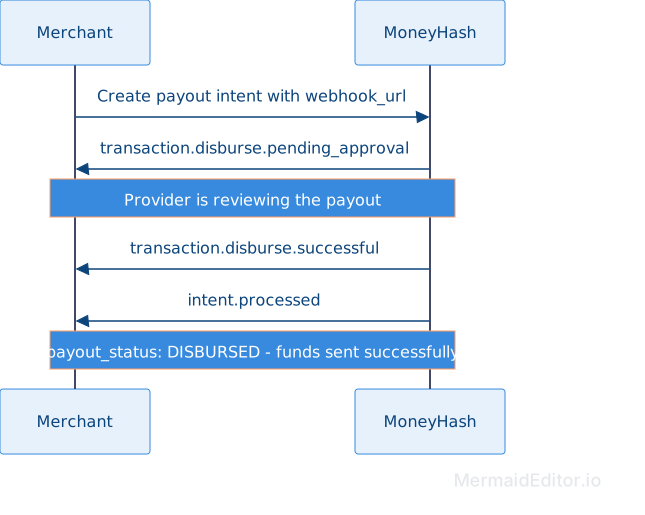
Successful disbursement flow completes when the provider processes and approves the payout. You receive transaction.disburse.pending_approval (if approval is required), then transaction.disburse.successful, and the intent's payout_status.status becomes DISBURSED once intent.processed fires.
Void flow may cancel an in-progress payout before funds are disbursed, but only if the provider supports voiding. If you initiate a void via POST /api/v1.4/payout/transactions/{transaction_id}/void/ while the disburse is still pending, you may receive transaction.void.successful or transaction.void.failed. Void webhook events are conditional on provider support and payout method - not all providers allow cancelling a payout attempt once it has started. A payout integration should not assume void events will always be available.
Close flow explicitly terminates a payout intent after a disburse has failed or is no longer needed. When you close an intent, payout_status becomes ABORTED and no further money movement occurs.
The table below shows which events to act on and which are informational.
| Webhook event | Merchant action |
|---|---|
transaction.disburse.successful | Funds have been disbursed to the beneficiary. This is the success signal for a payout. Wait for intent.processed to confirm the final state. |
transaction.disburse.failed | The disbursement attempt failed on this provider. MoneyHash does not automatically retry on another provider. The payout_status becomes DISBURSE_ATTEMPT_FAILED. You may retry the payout via the supported payout flow, or close the intent if the payout will not be retried. |
transaction.disburse.pending_approval | No action. The provider is awaiting approval before it disburses. |
intent.processed | The intent has reached its final state. Read payout_status.status to determine the outcome and act accordingly. This is the recommended event to act on. |
intent.processed with payout_status.status: DISBURSED | Funds have been sent successfully. This is the paid state. Mark the payout as complete. |
intent.processed with payout_status.status: VOIDED | The payout was cancelled before funds moved. No further action. |
intent.processed with payout_status.status: ABORTED | The intent ended without a successful disbursement. Do not mark as paid. |
intent.closed | The intent was explicitly closed. No further money movement will occur. |
transaction.void.successful | A void attempt succeeded and the payout was cancelled before funds moved. This is a conditional event that depends on provider support. The payout_status becomes VOIDED. |
transaction.void.failed | A void attempt failed. The disburse operation may continue. This is a conditional event that depends on provider support. |
Wait for intent.processed, then read payout_status.status to know what happened:
DISBURSED- funds were sent successfully. This is the success state for a completed payout.VOIDED- the payout was cancelled before funds moved, either through an explicit void or because the intent was closed during pending approval.ABORTED- the intent ended without a successful disbursement. The payout did not go through.
Do not rely on individual transaction operation status alone. payout_status.status is the authoritative source of truth for money movement. An operation may report successful but the intent-level payout_status takes precedence if the intent is later closed or voided.
The diagram below shows the webhook sequence for a successful payout.
Webhook delivery and idempotency
MoneyHash automatically retries webhook delivery when your endpoint does not acknowledge the webhook successfully. Your handler should be idempotent because the same event may be delivered more than once. For details on retry attempts, intervals, delivery failure conditions, and manual replay behavior, see Webhooks Overview.
Exploring payout webhooks
We recommend you use our Sandbox feature to explore each situation in which you will receive a notification. In addition, you can use webhook.site to receive and check the notification's content.
To explore how payout webhooks work, let's create a simple example with MoneyHash's Sandbox to understand what happens in both successful and closed scenarios.
- Access the Sandbox feature.
- Select a payout scenario.
- Replace the
webhook_urlat the payload with yours. Use the webhook.site solution to acquire a URL and further check the webhook notifications. - Submit the request.
- With the Sandbox, proceed with a payout while accompanying your webhook.site page.
You may notice that you receive multiple webhooks on your webhook.site page. To distinguish them, check the JSON of each notification and look for the type field. Each webhook indicates a different stage of the payout lifecycle.
The goal of exploring payouts is to understand that with every step taken on a payout, you will be notified through our webhook events whenever a status changes. Everything that happens with the intent, transaction, or operation - you will be notified to allow you to handle each situation better as your business sees fit.
Payout webhook scenarios
The following scenarios walk through exactly what webhooks fire, in what order, and what to look for in each payload.
The first webhook below shows the full payload structure. The webhooks that follow show only the key fields that change, since the remaining fields keep the same structure as the first payload.
Scenario 1: Successful disbursement
This scenario shows a single intent (LPdV4qa) going through a successful disbursement with provider approval. All three webhooks share the same transaction.id (07cff66f..) and operation.id (Zprr5En) because this is one transaction with one operation progressing through states.
Webhook 1 - Disburse awaiting provider approval
type: transaction.disburse.pending_approval
transaction.status:disburse.pending_approvaloperation.status:pending_approvalintent.payout_status.status:DISBURSE_ATTEMPT_PENDING
No action needed at this point. The provider is reviewing the payout for approval. Do not treat this as a failure.
{
  "type": "transaction.disburse.pending_approval",
  "intent": {
    "id": "LPdV4qa",
    "amount": {
      "value": "30.55",
      "currency": "USD",
      "formatted": 30.55,
      "display_value": "30.55 USD"
    },
    "created": "2026-08-15 05:24:42.652686+00:00",
    "aft_data": null,
    "flow_data": null,
    "custom_fields": null,
    "payout_status": {
      "status": "DISBURSE_ATTEMPT_PENDING"
    },
    "custom_form_answers": null
  },
  "account": {
    "id": "b97jnZv"
  },
  "status_id": "ZGqRGQe",
  "api_version": "1.4",
  "transaction": {
    "id": "07cff66f-e812-4e86-a591-1bc3d23c0178",
    "ip": {
      "country": {
        "name": null,
        "iso_code": null
      },
      "ip_address": null
    },
    "type": "payout",
    "method": {
      "id": "94NGQ7g",
      "display_name": "Provider A - Bank Account",
      "service_provider": {
        "id": "YgQRyZm",
        "display_name": "Provider A"
      }
    },
    "status": "disburse.pending_approval",
    "created": "2026-08-15 05:24:45.135993+00:00",
    "operations": [
      {
        "id": "Zprr5En",
        "arn": null,
        "rrn": null,
        "type": "disburse",
        "extra": {},
        "amount": {
          "value": "30.55",
          "currency": "USD",
          "formatted": 30.55,
          "display_value": "30.55 USD"
        },
        "status": "pending_approval",
        "statuses": [
          {
            "id": "943V6xJ",
            "code": "8000",
            "value": "pending",
            "created": "2026-08-15 05:24:45.160987+00:00",
            "message": "Pending",
            "localized_message": "Pending",
            "provider_error_code": null,
            "provider_error_message": null
          },
          {
            "id": "ZGqRGQe",
            "code": "8002",
            "value": "pending_approval",
            "created": "2026-08-15 05:25:00.825617+00:00",
            "message": "Pending Authorization",
            "localized_message": "Pending Authorization",
            "provider_error_code": null,
            "provider_error_message": null
          }
        ],
        "refund_type": null,
        "custom_fields": null,
        "latest_status": {
          "id": "ZGqRGQe",
          "code": "8002",
          "value": "pending_approval",
          "message": "Pending Authorization",
          "localized_message": "Pending Authorization",
          "provider_error_code": null,
          "provider_error_message": null
        },
        "authorization_code": null,
        "authorization_status": null,
        "acquirer_transaction_id": null
      }
    ],
    "billing_data": {
      "city": null,
      "name": null,
      "email": "[email protected]",
      "floor": null,
      "state": null,
      "street": null,
      "address": null,
      "country": "United States of America",
      "address1": null,
      "building": null,
      "apartment": null,
      "bank_code": null,
      "last_name": "Doe",
      "first_name": "John",
      "bank_number": null,
      "postal_code": null,
      "bank_account": null,
      "phone_number": "+19012345678",
      "account_number": "1234567890",
      "transaction_type": null,
      "mobile_wallet_number": null
    },
    "device_check": null,
    "shipping_data": null,
    "custom_message": "",
    "merchant_reference": null,
    "payment_method_details": null,
    "external_action_message": [],
    "provider_unique_reference": null,
    "provider_transaction_fields": {}
  },
  "operation_id": "Zprr5En"
}
Webhook 2 - Disbursement successful
type: transaction.disburse.successful
transaction.status:disburse.successfuloperation.status:successfulintent.payout_status.status:DISBURSEDstatusesarray shows full progression:pending-pending_approval-successful
This is a valid event to act on. For settlement purposes, intent.processed is recommended as the more reliable terminal signal.
{
  "type": "transaction.disburse.successful",
  "intent": {
    "id": "LPdV4qa",
    "payout_status": {
      "status": "DISBURSED"
    }
  },
  "status_id": "gXv8zXe",
  "api_version": "1.4",
  "transaction": {
    "id": "07cff66f-e812-4e86-a591-1bc3d23c0178",
    "status": "disburse.successful",
    "operations": [
      {
        "id": "Zprr5En",
        "type": "disburse",
        "status": "successful",
        "statuses": [
          {
            "code": "8000",
            "value": "pending",
            "message": "Pending"
          },
          {
            "code": "8002",
            "value": "pending_approval",
            "message": "Pending Authorization"
          },
          {
            "code": "6000",
            "value": "successful",
            "created": "2026-08-15 05:25:10.851398+00:00",
            "message": "Successful"
          }
        ],
        "latest_status": {
          "code": "6000",
          "value": "successful",
          "message": "Successful",
          "provider_error_code": null,
          "provider_error_message": null
        }
      }
    ]
  },
  "operation_id": "Zprr5En"
}
Webhook 3 - Intent processed
type: intent.processed
intent.status:PROCESSEDpayout_status.status:DISBURSEDtransactions_count:1
{
  "data": {
    "intent": {
      "id": "LPdV4qa",
      "ip": {
        "country": {
          "name": null,
          "iso_code": null
        },
        "ip_address": null
      },
      "type": "Payout",
      "amount": 30.55,
      "method": {
        "id": "94NGQ7g",
        "display_name": "Provider A - Bank Account"
      },
      "status": "PROCESSED",
      "account": "b97jnZv",
      "created": "2026-08-15T05:24:42.652686Z",
      "is_live": true,
      "billing_data": {
        "email": "[email protected]",
        "last_name": "Doe",
        "first_name": "John",
        "phone_number": "+19012345678"
      },
      "custom_fields": null,
      "payout_status": {
        "status": "DISBURSED"
      },
      "amount_currency": "USD",
      "max_payout_amount": "30.55",
      "active_transaction": {
        "id": "07cff66f-e812-4e86-a591-1bc3d23c0178",
        "type": "payout",
        "amount": "30.55",
        "status": "SUCCESSFUL",
        "created": "2026-08-15T05:24:45.135993Z",
        "operations": [
          {
            "id": "Zprr5En",
            "type": "disburse",
            "status": "successful",
            "latest_status": {
              "code": "6000",
              "value": "successful",
              "message": "Successful"
            }
          }
        ]
      },
      "transactions_count": 1,
      "transactions_history": [
        {
          "id": "07cff66f-e812-4e86-a591-1bc3d23c0178",
          "type": "payout",
          "amount": "30.55",
          "status": "SUCCESSFUL"
        }
      ]
    },
    "intent_id": "LPdV4qa"
  },
  "type": "intent.processed",
  "api_version": "1.4",
  "intent_type": "PAYOUT"
}
Scenario 2: Payout closed before completion
This scenario shows a single intent (ZAAeayN) that goes through pending approval, then is closed before the provider approves. The intent ends in a terminal state without a successful disbursement.
Webhook 1 - Disburse awaiting approval
type: transaction.disburse.pending_approval
transaction.status:disburse.pending_approvaloperation.status:pending_approvalintent.payout_status.status:DISBURSE_ATTEMPT_PENDING
{
  "type": "transaction.disburse.pending_approval",
  "intent": {
    "id": "ZAAeayN",
    "amount": {
      "value": 30.34,
      "currency": "USD"
    },
    "created": "2026-08-15 08:29:21.401552+00:00",
    "aft_data": null,
    "flow_data": null,
    "custom_fields": null,
    "payout_status": {
      "status": "DISBURSE_ATTEMPT_PENDING"
    },
    "custom_form_answers": null
  },
  "account": {
    "id": "b97jnZv"
  },
  "status_id": "gl70Ypm",
  "api_version": "1.1",
  "transaction": {
    "id": "cf209049-f2eb-4cfc-a5ad-e41a37edf339",
    "type": "payout",
    "method": {
      "id": "94NGQ7g",
      "display_name": "Provider A - Bank Account",
      "service_provider": {
        "id": "YgQRyZm",
        "display_name": "Provider A"
      }
    },
    "status": "disburse.pending_approval",
    "created": "2026-08-15 08:29:23.943575+00:00",
    "operations": [
      {
        "id": "gEeeEmO",
        "type": "disburse",
        "amount": {
          "value": 30.34,
          "currency": "USD"
        },
        "status": "pending_approval",
        "statuses": [
          {
            "id": "ZBbayO7",
            "code": "8000",
            "value": "pending",
            "created": "2026-08-15 08:29:23.968187+00:00",
            "message": "Pending"
          },
          {
            "id": "gl70Ypm",
            "code": "8002",
            "value": "pending_approval",
            "created": "2026-08-15 08:29:39.280466+00:00",
            "message": "Pending Authorization"
          }
        ],
        "latest_status": {
          "id": "gl70Ypm",
          "code": "8002",
          "value": "pending_approval",
          "message": "Pending Authorization"
        }
      }
    ],
    "billing_data": {
      "email": "[email protected]",
      "last_name": "Doe",
      "first_name": "John",
      "phone_number": "+19012345678",
      "account_number": "1234567890"
    }
  },
  "operation_id": "gEeeEmO"
}
Webhook 2 - Disburse succeeds, but intent is closed
type: transaction.disburse.successful
transaction.status:disburse.successfuloperation.status:successfulintent.payout_status.status:ABORTED
The operation reached successful status, but the intent-level payout_status is ABORTED. This occurs because the intent was explicitly closed via the close API. The authoritative source of truth for money movement is payout_status.status, not the operation status line.
{
  "type": "transaction.disburse.successful",
  "intent": {
    "id": "ZAAeayN",
    "payout_status": {
      "status": "ABORTED"
    }
  },
  "status_id": "gbJbR8Y",
  "api_version": "1.1",
  "transaction": {
    "id": "cf209049-f2eb-4cfc-a5ad-e41a37edf339",
    "status": "disburse.successful",
    "operations": [
      {
        "id": "gEeeEmO",
        "type": "disburse",
        "status": "successful",
        "statuses": [
          {
            "code": "8000",
            "value": "pending"
          },
          {
            "code": "8002",
            "value": "pending_approval"
          },
          {
            "code": "6000",
            "value": "successful",
            "created": "2026-08-15 08:40:25.543077+00:00",
            "message": "Successful"
          }
        ],
        "latest_status": {
          "code": "6000",
          "value": "successful",
          "message": "Successful"
        }
      }
    ]
  },
  "operation_id": "gEeeEmO"
}
Webhook 3 - Intent closed
type: intent.closed
intent.status:CLOSEDpayout_status.status:ABORTEDtransactions_count:1
Terminal webhook. The intent is now closed and no further money movement will occur.
{
  "data": {
    "intent": {
      "id": "ZAAeayN",
      "type": "Payout",
      "amount": 30.34,
      "method": {
        "id": "94NGQ7g",
        "display_name": "Provider A - Bank Account"
      },
      "status": "CLOSED",
      "account": "b97jnZv",
      "created": "2026-08-15T08:29:21.401552Z",
      "payout_status": {
        "status": "ABORTED"
      },
      "amount_currency": "USD",
      "active_transaction": {
        "id": "cf209049-f2eb-4cfc-a5ad-e41a37edf339",
        "type": "payout",
        "amount": "30.34",
        "status": "PENDING_APPROVAL"
      },
      "transactions_count": 1
    },
    "intent_id": "ZAAeayN"
  },
  "type": "intent.closed",
  "api_version": "1.1",
  "intent_type": "PAYOUT"
}
Testing a bulk payout webhook
1. Create a bulk payout request
Make a POST request to /api/v1.4/payout/bulk/requests/ with your webhook_url and at least one item:
{
  "label": "test bulk payout",
  "webhook_url": "https://yourapp.com/webhooks/payout",
  "items": [
    {
      "merchant_reference": "order-0001",
      "scheduled_date": "2026-06-01",
      "payout_intent_details": {
        "amount": 50,
        "amount_currency": "ngn",
        "customer_id": "8c91204b-5a5b-4496-9904-76a6b72bc15d",
        "payout_method": "BANK_ACCOUNT",
        "webhook_url": "https://yourapp.com/webhooks/payout"
      }
    }
  ]
}
2. Watch webhook.site - validation phase
Immediately after submission you will receive two events in quick succession:
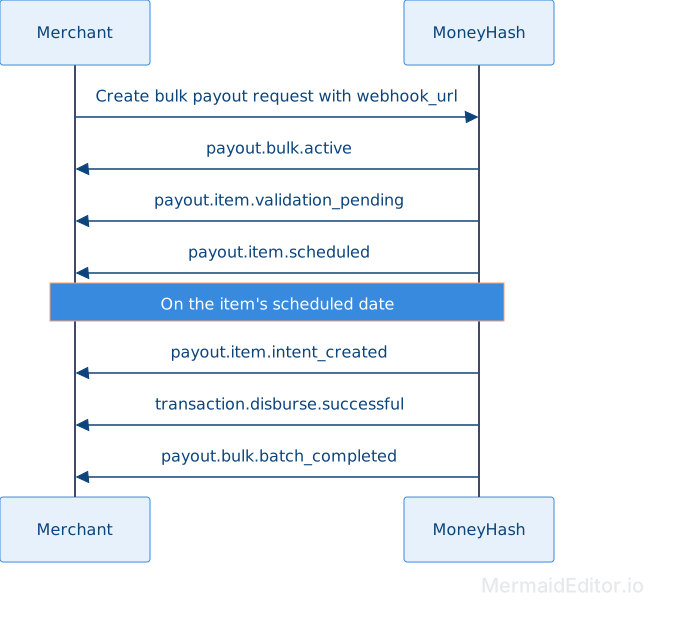
payout.bulk.active- confirms the request was created. The payload includes the full items array with each item inVALIDATION_PENDINGstatus.payout.item.validation_pending- fires per item as each one enters the validation queue.
Depending on the outcome:
payout.item.scheduled- validation passed, item is scheduled for itsscheduled_datepayout.item.validation_failed- validation failed. Checkvalidation_result.errorsin the payload to see exactly which fields failed and why.
3. Watch webhook.site - execution phase
On the item's scheduled_date, execution begins. You will receive:
payout.item.intent_created- a payout intent was successfully created for this item. Standard payout lifecycle webhooks follow from this point.payout.item.intent_creation_failed- the intent could not be created. The item moves toINTENT_CREATION_FAILED. No further webhooks fire for this item.
4. After intent creation
Once an item's payout intent is created, the same individual payout webhooks fire for that intent:
transaction.disburse.pending_approval(if approval is required)transaction.disburse.successfulortransaction.disburse.failed
When you receive payout.item.intent_created, store the mapping between the bulk item and the created payout intent.id. Use this intent.id as the primary correlation key for all subsequent disbursement and intent-level webhooks for that payout.
5. When the batch is done
Once all items have been processed - validated, executed, or failed - you will receive payout.bulk.batch_completed. The payload includes a count breakdown showing how many items ended in each status.
The sequence below shows the events for a single item from request creation through disbursement.
Important notes
On acting on payouts: Wait for intent.processed or intent.closed, then check payout_status.status. DISBURSED means the funds were sent and the payout is complete. VOIDED means the payout was cancelled before funds moved. ABORTED means the intent ended without a successful disbursement, and funds did not move.
On payout_status vs operation status: Do not rely on individual transaction operation status (successful, pending_approval, failed) as the sole indicator of money movement. The operation status shows the step-by-step progression of the disburse attempt, but the authoritative source of truth for whether funds actually moved is payout_status.status at the intent level.
On voids: Voiding a payout is only possible while the disburse is still in progress (pending, pending_verification, or pending_approval status), and support depends on the provider. Not all providers allow cancelling a payout once it has started.
On correlating payout webhooks: Use the MoneyHash payout intent.id as the primary correlation key for all payout lifecycle webhooks (transaction.disburse.*, intent.processed, intent.closed, etc). For bulk payouts, when you receive payout.item.intent_created, persist the mapping between the bulk item and the created intent.id. Then use that intent.id to correlate subsequent disbursement and intent-level webhooks back to the original bulk item. The merchant_reference field, when present in the payload, can be used as a merchant-side reference but may be null and should not be treated as the authoritative correlation key.
You can create other payouts or bulk requests to explore the webhook notifications further. Access the Webhook Types page to learn more about all available payout webhook events and their payloads.
Updated 2 months ago