
Payouts
MoneyHash Payouts lets you send funds directly to customers, beneficiaries, or third parties — whether that's a withdrawal, a refund, an affiliate commission, or a marketplace settlement. This guide covers the full individual payout lifecycle: creating a payout, tracking it, cancelling it, and closing it cleanly.
Need to pay many recipients at once? See Bulk Payouts — a single request can schedule up to 1,000 payouts simultaneously.
Core concepts
Understanding payouts in MoneyHash requires familiarity with three layered entities: Intent, Transaction, and Operation. Each maps to a distinct role.
Intent
A Payout Intent is the top-level container for the entire payout lifecycle. It holds metadata about the payout (amount, currency, customer) and tracks the overall outcome.
intent_status | Description |
|---|---|
unprocessed | Default state. The payout is in progress or has failed but can be retried. It remains unprocessed until the transaction succeeds or the intent is closed. |
processed | Terminal state. A disburse or void operation completed successfully. |
closed | Terminal state. You explicitly closed the intent — no further actions possible. |
Transaction
A Transaction is an execution attempt within an intent. It is created automatically when you create a payout and becomes the primary reference entity once a disburse operation succeeds.
Operations
Operations are the financial actions that move (or cancel) money. Two types exist:
Disburse — executes the payout. Created automatically on payout creation.
disburse_status | Terminal? | Description |
|---|---|---|
pending | No | Queued for processing |
pending_verification | No | Provider is awaiting verification |
pending_approval | No | Awaiting approval before execution |
successful | Yes | Funds disbursed successfully |
failed | Yes | Disbursement failed |
Void — cancels an in-progress payout. Initiated by you.
void_status | Terminal? | Description |
|---|---|---|
pending | No | Cancellation in progress |
successful | Yes | Payout cancelled — no funds moved |
failed | Yes | Cancellation failed — disburse continues |
Payout status
payout_status is a high-level summary of money movement — independent of intent_status. Use it to answer "did money move?" without reasoning through intent and operation states.
payout_status | When |
|---|---|
no_disburse_attempts | Payout created, disburse not yet started |
disburse_attempt_pending | Disburse is in progress |
disbursed | Funds sent successfully |
disburse_attempt_failed | Disburse failed |
voided | Payout cancelled before funds moved |
aborted | Intent closed without a successful disburse |
intent_status— lifecycle state (is this intent open or done?)payout_status— money movement outcome (did funds move?)
Payout lifecycle
Main flow
Every payout follows the same flow: intent created → provider processes the disburse → terminal outcome.
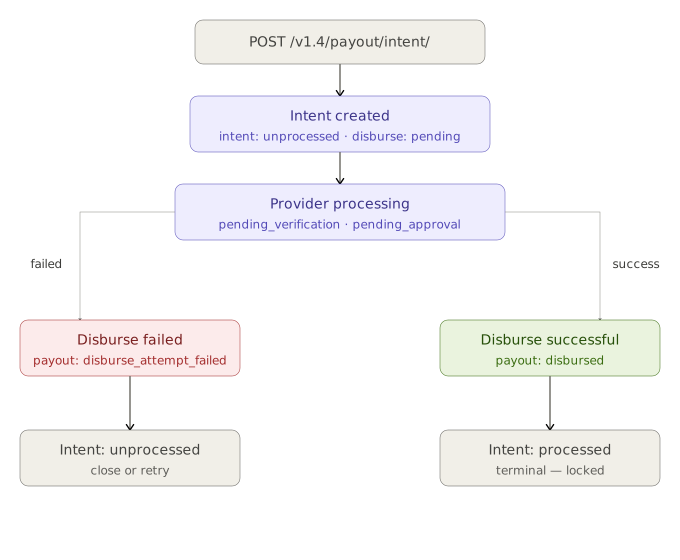
The key states to watch:
| Stage | intent_status | payout_status |
|---|---|---|
| Just created | unprocessed | no_disburse_attempts |
| Provider processing | unprocessed | disburse_attempt_pending |
| Funds sent | processed | disbursed |
| Disburse failed | unprocessed | disburse_attempt_failed |
Void and close paths
Two optional actions let you intervene before or after a disburse completes.
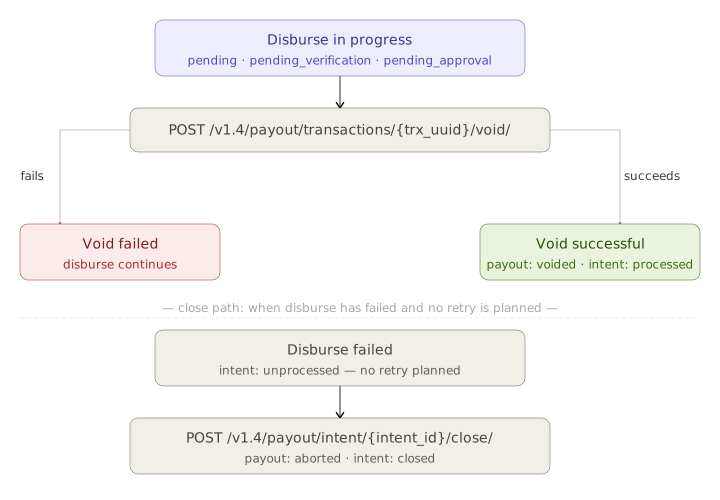
| Action | When | Outcome on success |
|---|---|---|
| Void | Disburse is pending, pending_verification, or pending_approval | payout: voided · intent: processed |
| Close | Disburse failed, no retry planned | payout: aborted · intent: closed |
Creating a payout
{
  "amount_currency": "ngn",
  "amount": 100,
  "customer_id": "8c91204b-5a5b-4496-9904-76a6b72bc15d",
  "webhook_url": "https://yourapp.com/webhooks/payout"
}
What happens automatically:
- A Payout Intent is created with
intent_status: UNPROCESSED. - A Transaction is created inside the intent.
- A Disburse operation is created with status
pending. - Provider processing begins.
- Webhooks are sent as status changes occur.
Example response:
{
  "status": {
    "code": 200,
    "message": "success",
    "errors": []
  },
  "data": {
    "embed_url": "https://embed.moneyhash.io/embed/payout/ZAlyR3g",
    "id": "ZAlyR3g",
    "type": "Payout",
    "amount": "100.00",
    "amount_currency": "NGN",
    "status": "UNPROCESSED",
    "payout_status": {
      "status": "NO_DISBURSE_ATTEMPTS"
    },
    "active_transaction": null,
    "transactions_history": [],
    "state": "INTENT_FORM",
    "state_details": {
      "embed_url": "https://yourapp.com/webhooks/payout"
    },
    "billing_data": null,
    "created": "today"
  },
  "count": 1,
  "next": null,
  "previous": null
}
Monitor via webhooks. After creation, listen for webhook events as MoneyHash processes the payout with the provider.
Using saved payout methods
Instead of submitting raw beneficiary data on every payout, you can save a payout method to a customer and reference it by token. This reduces repeated data entry, minimises errors, and limits exposure of sensitive details.
Supported method types:
- Bank account
- Card (via Vault, for PCI compliance)
- Mobile wallet
- Mobile money
To use a saved method, provide the payout method token in your payout request instead of raw beneficiary fields. The token must belong to the customer_id in the same request.
Important: Saved payout methods only change how beneficiary data is sourced. The disburse/void lifecycle, status transitions, and webhooks behave identically to payouts using raw data.
Validation on save: When a method is saved, MoneyHash performs format validation only (IBAN structure, Luhn check for cards, MSISDN format for wallets). No provider calls are made and no funds are moved.
Customer billing requirement: The customer linked to a saved payout method must have complete billing information — full name, phone, email, and billing address — before payouts using that method can execute successfully.
Cancelling a payout (void)
A void cancels an in-progress payout before funds are disbursed.
Void is only available when the disburse status is:
pendingpending_verificationpending_approval
If void succeeds:
payout_status→voidedintent_status→processed- No funds are moved.
If void fails:
- The disburse operation continues.
payout_statusreflects the eventual disburse outcome.- Funds may still be disbursed.
Not all providers support cancelling a payout once it is in progress. Contact MoneyHash support to confirm void availability for your integration.
Closing a payout intent
Closing permanently terminates a payout intent. Use this when a disburse has failed and you do not intend to retry, or when a payout is no longer needed.
What closing does:
- Sets
intent_status→closed - Sets
payout_status→aborted - Locks the intent — no further operations possible
When you cannot close:
- After a successful disburse (
intent_statusis alreadyprocessed) - After a successful void (
intent_statusis alreadyprocessed)
Explicitly close failed intents rather than leaving them open. This keeps your system state clean, avoids orphaned intents, and makes it unambiguous that no further money movement will occur.
Close vs. void: Void is for cancelling money movement. Close is for ending the intent lifecycle. They serve different purposes and are not interchangeable.
Webhooks
MoneyHash sends webhooks for every significant payout status change — intent updates, disburse transitions, and void outcomes. Configure your webhook_url when creating the payout intent.
See Webhooks and Webhook Types for payload structure and event types.
API reference summary
| Method | Endpoint | Description |
|---|---|---|
POST | /api/v1.4/payout/intent/ | Create a payout intent |
POST | /api/v1.4/payout/transactions/{transaction_id}/void/ | Cancel an in-progress payout |
POST | /api/v1.4/payout/intent/{intent_id}/close/ | Close a payout intent |
For complete parameter documentation, see the API Reference.
Updated 17 days ago