

Overview
MoneyHash supports two layers of integration that work together. Your backend creates an intent - mapped to your order - and drives the payment. How your customer experiences checkout depends on which client-side integration you layer on top.
Every integration starts with a server-side call to create an intent. For Direct API, that is the full integration - you own the customer experience end to end. For Payment APIs, you pair the server-side intent creation with a client-side layer - Embedded or SDK - which renders the checkout UI to your customer. For External API, MoneyHash renders a secure card input on your frontend - no client-side layer required.
This page assumes you have completed your account configuration in the MoneyHash dashboard. You can test any integration using the interactive sandbox under the Developer section.
How integration works
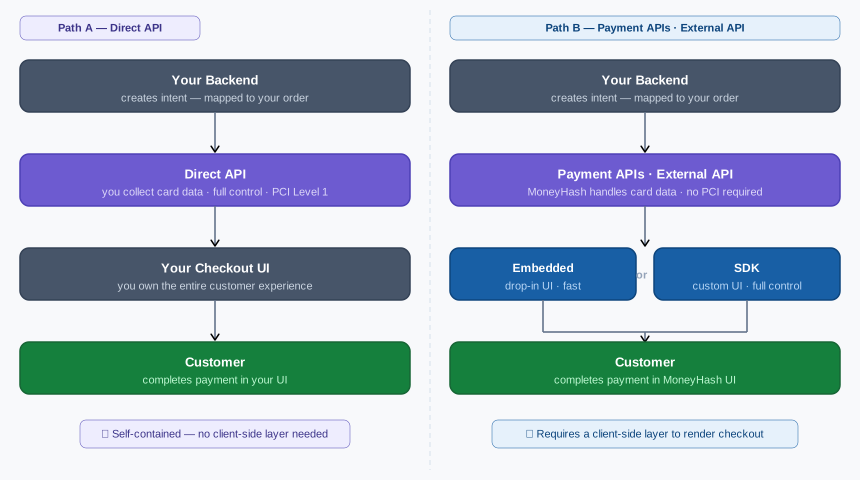
Server-side integration types
All three server-side types use the MoneyHash API. The difference is who collects card data and how much control you have over the checkout flow.
Payment APIs
The standard integration for most merchants. Your backend creates an intent and MoneyHash handles routing, retries, and provider communication - through the Embedded or SDK client-side layer which renders checkout to your customer.
- No PCI compliance required
- MoneyHash collects and vaults card data
- Requires a client-side layer (Embedded or SDK)
External API
A fully API-driven integration where MoneyHash still handles card data collection. Use this when you want complete API control without building a card form - MoneyHash renders the card input securely on your behalf.
- No PCI compliance required
- MoneyHash collects card data via a secure card input rendered on your frontend
- Best for API-first teams who want programmatic control without card data liability
Direct API
A fully API-driven integration where you collect card data from the customer and transmit it to MoneyHash. You own every step of the checkout experience - no client-side layer required.
You are responsible for collecting, handling, and transmitting cardholder data. Attempting to use this integration without PCI certification violates card network rules. Contact MoneyHash before enabling this integration.
Client-side integration types
Client-side integration renders the checkout UI to your customer. It is required for Payment APIs and External API, and sits on top of your server-side intent creation.
Client-side integration requires a working server-side integration. If you haven't completed that yet, start with one of the server-side types above.
Embedded Experience
A drop-in checkout UI that MoneyHash renders inside your page. You create an intent server-side, then embed the MoneyHash checkout using an iframe or redirect. Minimal frontend code required.
- No custom UI development needed
- MoneyHash controls the look and feel
- Limited customization - colors and basic layout only
- Fastest path to a working checkout
→ View Embedded Experience docs
SDK
Use a MoneyHash SDK when you need full control over the customer experience - custom card forms, native pay buttons, and your own method selection UI.
- Available for Web (JavaScript), iOS, Android, Flutter, and React Native
- Full control over UI and UX
- Supports Apple Pay, Google Pay, installments, subscriptions, and saved cards
- Higher implementation effort than Embedded
Comparison
| Payment APIs | External API | Direct API | Embedded | SDK | |
|---|---|---|---|---|---|
| Type | Server-side | Server-side | Server-side | Client-side | Client-side |
| Requires API calls | ✅ | ✅ | ✅ | ✅ | ✅ |
| PCI required | ❌ | ❌ | ✅ Level 1 | ❌ | ❌ |
| You collect card data | ❌ | ❌ | ✅ | ❌ | ❌ |
| Client-side layer required | ✅ | ❌ | ❌ | - | - |
| Custom card form | ❌ | ❌ | ✅ | ❌ | ✅ |
| Custom method selection | ❌ | ❌ | ✅ | ❌ | ✅ |
| Native pay (Apple Pay, Google Pay) | ❌ | ✅ | ✅ | ❌ | ✅ |
Next steps
| If you are... | Start here |
|---|---|
| Building a standard payment flow | Payment APIs |
| Integrating fully via API, no card data liability | External API |
| PCI Level 1 certified and need full control | Direct API |
| Adding a drop-in checkout UI | Embedded Experience |
| Building a custom checkout experience | SDK |
Updated 2 months ago