

Recurring Payments
With MoneyHash you can charge a customer's stored card without them being present - a subscription renewal, a ride fare, a usage-based top-up. These are merchant-initiated transactions (MIT), and there are two flavours: Recurring, for charges on a fixed schedule, and Unscheduled, for charges triggered by usage rather than a calendar.
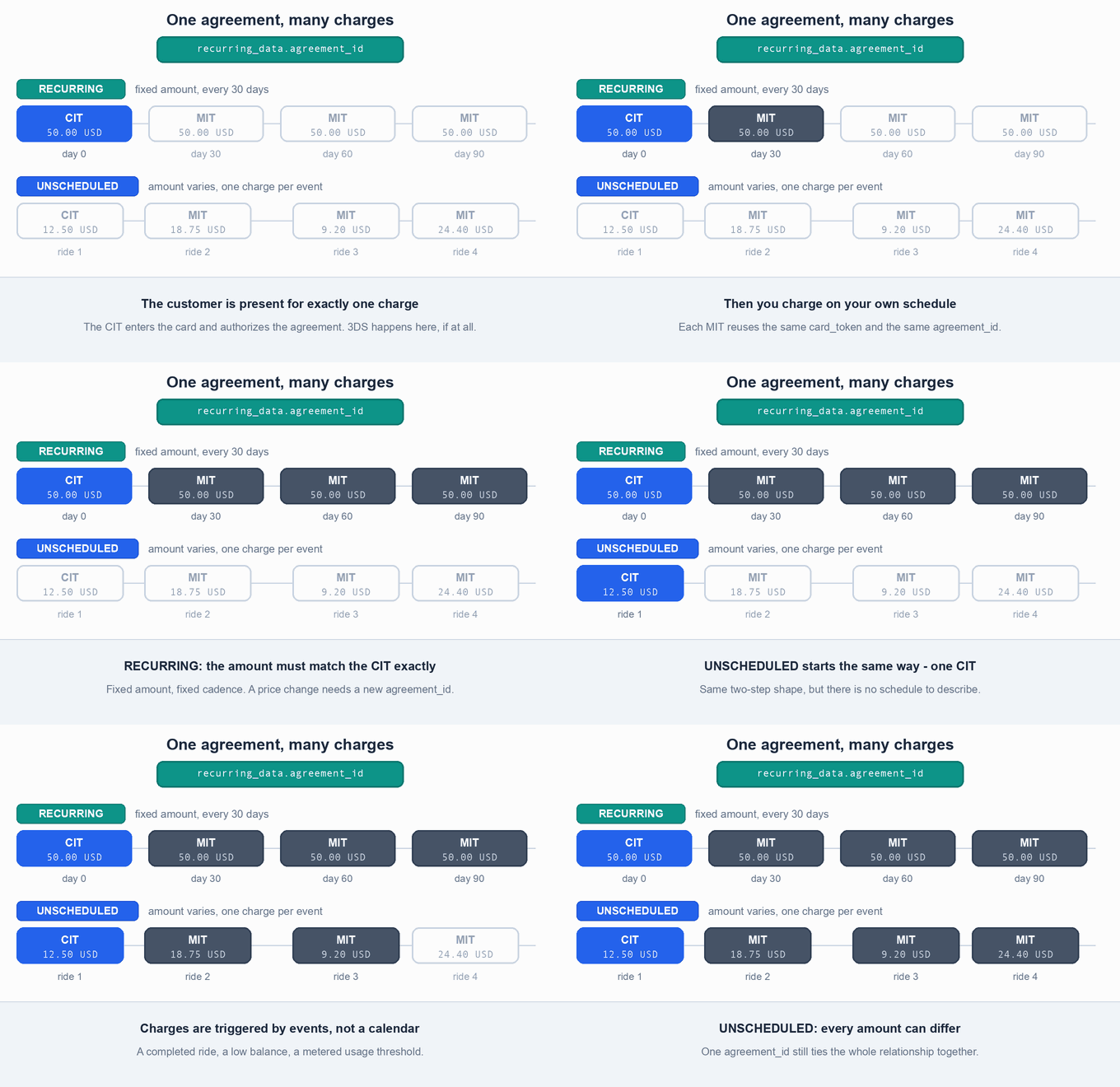
Both follow the same two-step shape. The customer is present for exactly one transaction - the customer-initiated transaction (CIT) - where they enter their card and authorize you to store it under an agreement. Every charge after that is an MIT: you trigger it from your backend, the customer is not involved, and no 3D Secure challenge is shown. This page covers that flow end to end: which payment_type to send, how the CIT and MIT requests differ, what recurring_data carries, and what to check when a charge is rejected.
Merchant-initiated transaction (MIT) - you submit a transaction using previously stored card details, without the cardholder taking part.
Cardholder-initiated transaction (CIT) - the cardholder actively selects the card and completes the transaction themselves.
Every agreement in this guide is one CIT followed by any number of MITs.
When to use it
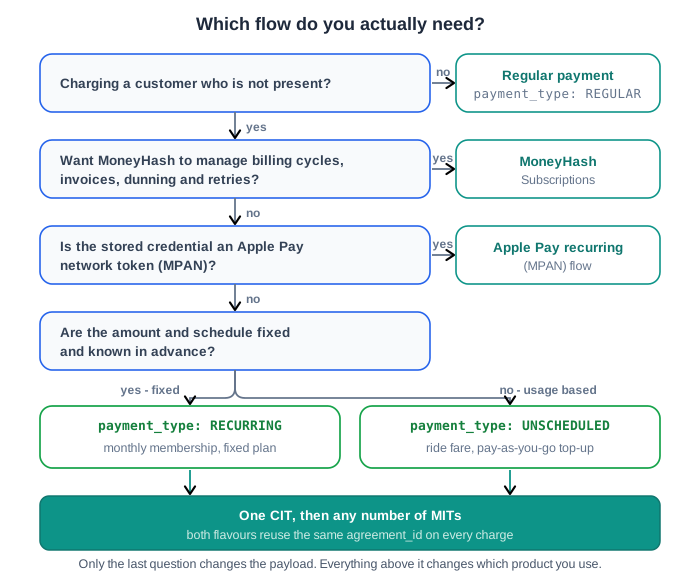
Four options solve overlapping problems here, and picking the wrong one is the most common mistake teams make. Work down this before writing any code:
| If you need to... | Use |
|---|---|
| Charge a fixed amount on a fixed schedule you control at the API level - a 9.99 USD/month membership, a fixed-term installment plan | payment_type: RECURRING (this page) |
| Charge a variable or unpredictable amount, triggered by usage rather than a calendar - a ride fare, a pay-as-you-go top-up | payment_type: UNSCHEDULED (this page) |
| Offload billing-cycle management entirely - plans, invoices, retries, prorations - instead of orchestrating charges yourself | Manage Subscriptions |
| Charge a card the customer selects at checkout, once, with them present | A regular payment, payment_type: REGULAR - see Create a Payment |
| Recharge an Apple Pay network token (MPAN) rather than a raw card | Apple Pay recurring payments (MPANs) |
The RECURRING/UNSCHEDULED flow on this page and the Subscriptions product both end up charging a stored card repeatedly, but they are different systems with different lifecycles. Subscriptions gives you a plan and a subscription object with statuses (ACTIVE, PAST_DUE, CANCELLED) and invoices that MoneyHash tracks for you. The flow on this page gives you the charge and nothing else - you own the schedule, the retry logic and the record-keeping, identified only by the agreement_id you generate. If what you actually want is Subscriptions, do not build your own scheduler on top of raw MIT; you will re-implement it.
Before you start
Every agreement needs two things to exist first:
- A Customer record. Create one via the Customer API and keep its
customer_id- the same customer goes on the CIT and on every MIT in the agreement. - A tokenized card, produced by the CIT itself. You do not tokenize separately beforehand - the CIT tokenizes the card as part of the first charge. See Tokenize Cards for how
tokenize_card,show_save_card_checkboxandshow_mandatory_save_card_checkboxdiffer.
Provider support is the other prerequisite, and the one most likely to bite:
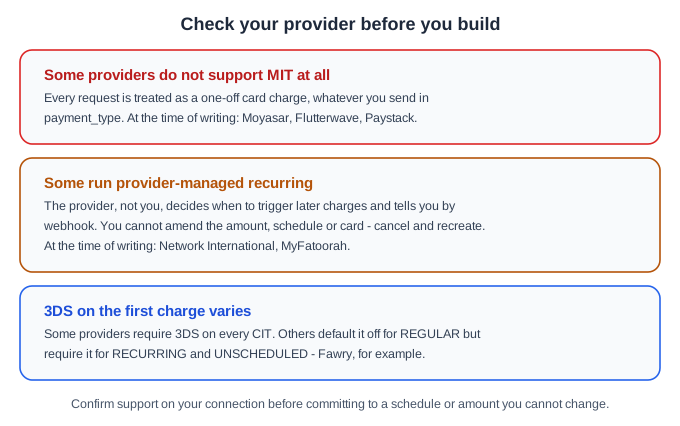
Provider-managed recurring is the case worth planning around: once the agreement exists you cannot amend its amount, schedule or card through the MoneyHash API - you cancel it and create a new one. Check your connection before committing to terms your integration cannot later change.
How the CIT to MIT flow works
One CIT, then any number of MITs, all tied together by an agreement_id you generate and control:
The requests and webhooks in full:
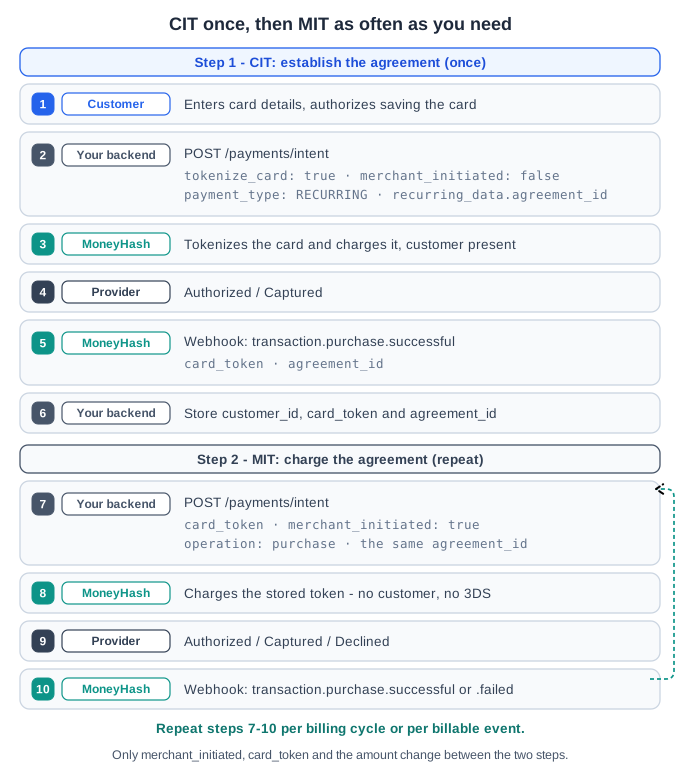
Every request below goes to the same endpoint:
The recurring_data object
| Field | Type | Required | Applies to | Description |
|---|---|---|---|---|
agreement_id | string | Yes, on every CIT and MIT | Recurring & Unscheduled | An identifier you generate - a UUID works well. It must be byte-for-byte identical across the CIT and every later MIT; it is the only thing that links them into one agreement. |
number_of_payments | integer | Optional | Recurring only | How many recurring payments the customer will make. |
days_between_payments | integer | Optional | Recurring only | Days between each payment. |
expiry_date | string (YYYY-MM-DD) | Optional | Recurring only | The date the agreement should be treated as expired. |
recurring_data describes the agreement - it does not automate it
Setting number_of_payments, days_between_payments and expiry_date tells MoneyHash and the provider what the agreement's terms are. It does not make MoneyHash trigger the MITs for you on a timer. You call the MIT endpoint yourself, at the right time, for the life of the agreement. If you want MoneyHash to own that scheduling, use Subscriptions.
Fields required on every request
| Field | Type | Required | Notes |
|---|---|---|---|
amount | number | Yes | On a RECURRING MIT this must match the CIT amount exactly. UNSCHEDULED MITs may vary. |
amount_currency | string | Yes | ISO 4217 currency code. |
operation | string | Yes | purchase or authorize on the CIT. Must be purchase on every MIT - MITs cannot authorize-only. |
customer | string | Yes | The same customer_id on the CIT and every MIT. |
webhook_url | string | Yes | Where MoneyHash sends transaction status updates. |
merchant_initiated | boolean | Yes | false on the CIT, true on every MIT. |
payment_type | string | Yes | RECURRING or UNSCHEDULED, identical on the CIT and every MIT in the agreement. |
tokenize_card | boolean | CIT only | true to save the card as part of the CIT. |
card_token | string | MIT only | The token returned on the CIT's webhook. |
recurring_data | object | Yes | See above. |
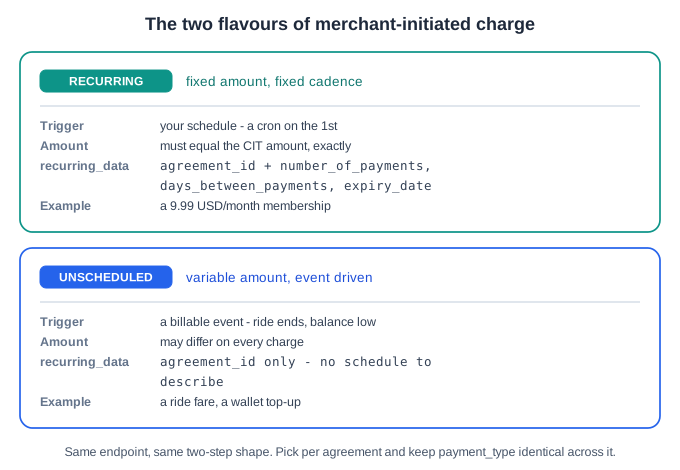
Recurring or Unscheduled?
Same endpoint, same two-step shape. What differs is the trigger, whether the amount may move, and whether recurring_data carries a schedule:
Step by step: Recurring payments
Use this when the amount and cadence are fixed and known upfront - a membership fee, a fixed-term installment.
Step 1 - CIT: create the agreement
The customer is present, enters full card details, and authorizes the agreement. Include tokenize_card: true so the card is saved for the MITs that follow.
curl --request POST \
  --url https://web.moneyhash.io/api/v1.4/payments/intent/ \
  --header 'Authorization: Token <YOUR_API_KEY>' \
  --header 'Content-Type: application/json' \
  --data '{
    "amount": 50,
    "amount_currency": "USD",
    "operation": "purchase",
    "customer": "<CUSTOMER_ID>",
    "merchant_initiated": false,
    "tokenize_card": true,
    "payment_type": "RECURRING",
    "recurring_data": {
      "agreement_id": "<YOUR_AGREEMENT_ID>",
      "number_of_payments": 10,
      "days_between_payments": 30,
      "expiry_date": "2027-01-01"
    },
    "webhook_url": "https://your-server.com/webhooks/moneyhash"
  }'
When transaction.purchase.successful fires, store the card_token, the customer_id and the agreement_id - you need all three for every MIT.
Step 2 - MIT: charge the agreement
Repeat this on your own schedule, for example a cron job on the 1st of each month. No customer interaction, no CVV, no 3DS.
curl --request POST \
  --url https://web.moneyhash.io/api/v1.4/payments/intent/ \
  --header 'Authorization: Token <YOUR_API_KEY>' \
  --header 'Content-Type: application/json' \
  --data '{
    "amount": 50,
    "amount_currency": "USD",
    "operation": "purchase",
    "customer": "<CUSTOMER_ID>",
    "card_token": "<CARD_TOKEN_ID>",
    "merchant_initiated": true,
    "payment_type": "RECURRING",
    "recurring_data": {
      "agreement_id": "<YOUR_AGREEMENT_ID>"
    },
    "webhook_url": "https://your-server.com/webhooks/moneyhash"
}'On a RECURRING MIT, amount must equal the amount used on the CIT. If your price changes you need a new agreement with a new agreement_id, not a different amount on the existing one.
Step by step: Unscheduled payments
Use this when charges are triggered by usage rather than a calendar - a ride-hailing app charging for a completed ride, a wallet that tops itself up when the balance runs low.
Step 1 - CIT: create the agreement
Functionally identical to the Recurring CIT, except payment_type is UNSCHEDULED and recurring_data needs only agreement_id - there is no schedule to describe.
curl --request POST \
  --url https://web.moneyhash.io/api/v1.4/payments/intent/ \
  --header 'Authorization: Token <YOUR_API_KEY>' \
  --header 'Content-Type: application/json' \
  --data '{
    "amount": 12.50,
    "amount_currency": "USD",
    "operation": "purchase",
    "customer": "<CUSTOMER_ID>",
    "merchant_initiated": false,
    "tokenize_card": true,
    "payment_type": "UNSCHEDULED",
    "recurring_data": {
      "agreement_id": "<YOUR_AGREEMENT_ID>"
    },
    "webhook_url": "https://your-server.com/webhooks/moneyhash"
  }'
Step 2 - MIT: charge on usage
Trigger this whenever the billable event happens. The amount can differ from the CIT and from one MIT to the next.
curl --request POST \
  --url https://web.moneyhash.io/api/v1.4/payments/intent/ \
  --header 'Authorization: Token <YOUR_API_KEY>' \
  --header 'Content-Type: application/json' \
  --data '{
    "amount": 18.75,
    "amount_currency": "USD",
    "operation": "purchase",
    "customer": "<CUSTOMER_ID>",
    "card_token": "<CARD_TOKEN_ID>",
    "merchant_initiated": true,
    "payment_type": "UNSCHEDULED",
    "recurring_data": {
      "agreement_id": "<YOUR_AGREEMENT_ID>"
    },
    "webhook_url": "https://your-server.com/webhooks/moneyhash"
  }'
Confirming the charge
Both flavours report status the same way - by webhook, not in the synchronous API response. Check type and intent.payment_status.status exactly as you would for any payment (see Create a Payment):
{
  "type": "transaction.purchase.successful",
  "intent": {
    "id": "<INTENT_ID>",
    "payment_status": { "status": "CAPTURED" }
  },
  "transaction": {
    "id": "<TRANSACTION_ID>",
    "status": "purchase.successful"
  }
}If your MIT trigger might fire twice for the same billable event - a retried cron job, a duplicate webhook from an upstream system - send an X-Idempotency-Key header unique to that charge attempt. Without it a retried MIT is indistinguishable from a legitimate second charge, and MoneyHash has no way to know it was not intentional. See Programmatic Access for the full idempotency contract.
Common errors and troubleshooting
| Symptom | Likely cause | Fix |
|---|---|---|
| The MIT is charged as a one-off, or rejected outright | The connected provider does not support MIT or recurring at all | Confirm the provider supports RECURRING/UNSCHEDULED before onboarding this flow; route to a supporting provider, or use Subscriptions. |
A RECURRING MIT is rejected for an amount mismatch | amount on the MIT does not exactly equal the CIT's amount | Charge the same amount, or start a new agreement with a new agreement_id if the price genuinely changed. |
The MIT fails validation on operation | operation was sent as something other than purchase | MITs only support purchase. Use authorize on the CIT only, if you need auth-then-capture. |
| The MIT is rejected, or silently starts an unrelated agreement | agreement_id on the MIT does not exactly match the CIT's | Store the exact string from the CIT and reuse it verbatim. Treat it as opaque - never reformat it. |
The MIT fails because there is no card_token | An MIT was attempted before a successful CIT completed | An MIT cannot exist without a prior successful CIT. Confirm you received transaction.purchase.successful and captured its card_token first. |
| The customer sees a 3DS challenge on what should be an MIT | merchant_initiated was left false, or the request was not recognized as an MIT | 3DS only applies with the cardholder present. Check merchant_initiated: true on every MIT; some providers still apply their own step-up rules. |
| Recurring charges do not appear as a subscription in the dashboard | This flow is deliberately separate from Subscriptions - there are no plan or invoice objects | If you need plan management, invoicing and lifecycle statuses, move to Manage Subscriptions rather than layering your own on top. |
| An Apple Pay card token is rejected on an MIT | Apple Pay network tokens need paying_with_network_token: true in addition to the fields above | Follow Apple Pay recurring payments (MPANs) rather than the plain card flow on this page. |
Updated about 2 months ago