

Subscription Plans
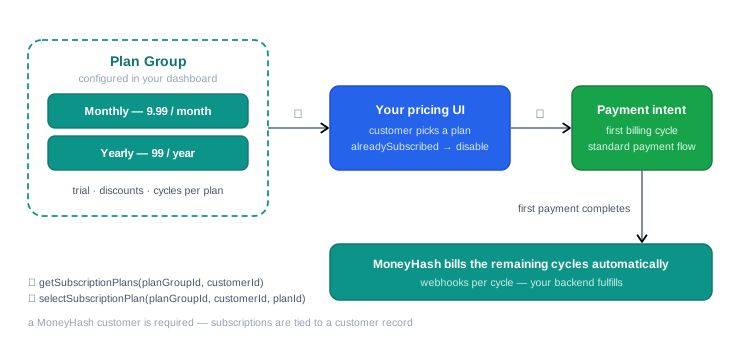
Subscription Plans let customers subscribe to recurring payment plans managed through MoneyHash. Your frontend retrieves the available plans with the SDK, presents them to the customer, and subscribes them to the selected plan - which returns a payment intent to complete the first billing cycle. From then on, MoneyHash bills the remaining cycles automatically. This page covers the full flow on every platform - Web (JavaScript), iOS, Android, Flutter, and React Native.
How it works
You configure plan groups in the MoneyHash dashboard - each group holds plans that share a currency, and each plan carries its own billing interval, trial period, discounts, and cycle count. Your app's job is exactly three calls: fetch the plans for a customer, render your pricing UI, and subscribe the pick. The subscription's first cycle is a normal payment intent - you complete it with the standard payment flow you already have - and every later cycle is billed by MoneyHash without your code involved.
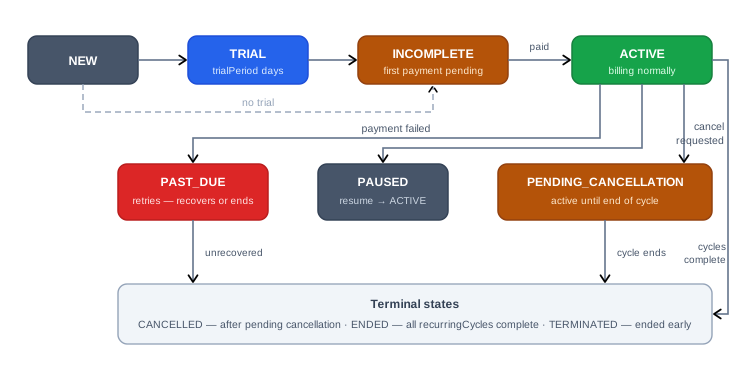
Once created, a subscription moves through a lifecycle your backend should track via webhooks:
Prerequisites
- SDK initialized with your account's public API key
- Subscription plans and plan groups configured in the MoneyHash dashboard under Plan Groups
- A MoneyHash customer must exist - subscription plans are always associated with a customer record
Type reference
The same shapes on every platform - the mobile models mirror these fields.
SubscriptionPlan
| Field | Type | Description |
|---|---|---|
id | string | Unique plan identifier |
name | string | Plan display name |
description | string | Plan description |
amount | number | Recurring payment amount |
currency | string | ISO 4217 currency code |
recurrency | number | Billing interval - number of units |
recurrencyUnit | "MONTH" | Billing interval unit |
recurringCycles | number | null | Total number of billing cycles. null for indefinite |
trialPeriod | number | null | Trial period in days. null if no trial |
oneTimeFee | number | null | One-time fee charged at signup. null if none |
discountAmount | number | null | Fixed discount amount applied |
discountPercentage | number | null | Percentage discount applied |
discountCycles | number | null | Number of cycles the discount applies to |
alreadySubscribed | boolean | Whether this customer is already subscribed to this plan |
isLive | boolean | Whether the plan is in live mode |
created | string | ISO 8601 creation timestamp |
SubscriptionPlanGroup
| Field | Type | Description |
|---|---|---|
id | string | Unique plan group identifier |
name | string | Plan group display name |
currency | string | Currency for plans in this group |
plans | SubscriptionPlan[] | List of plans within this group |
created | string | ISO 8601 creation timestamp |
SubscriptionStatus - the status of a customer's subscription:
| Status | Description |
|---|---|
NEW | Subscription created, not yet active |
TRIAL | Customer is in the trial period |
INCOMPLETE | First payment not yet completed |
ACTIVE | Subscription is active and billing normally |
PAST_DUE | Payment failed - subscription at risk |
PENDING_CANCELLATION | Cancellation requested, still active until end of cycle |
CANCELLED | Subscription cancelled |
ENDED | All recurring cycles completed |
TERMINATED | Subscription terminated early |
PAUSED | Subscription temporarily paused |
Step 1 - Retrieve subscription plans for a customer
Get the list of available plans within a plan group for a specific customer. The alreadySubscribed flag on each plan tells you whether the customer is already on it - use it to disable or highlight those plans in your UI.
const subscriptionPlans = await moneyHash.getSubscriptionPlans({
  planGroupId: "<plan-group-id>",
  customerId: "<customer-id>",
});

// SubscriptionPlan[]
let subscriptionPlans = try await moneyHash.getSubscriptionPlans(
planGroupId: "<plan-group-id>",
customerId: "<customer-id>"
)
// [SubscriptionPlan]val subscriptionPlans = moneyHash.getSubscriptionPlans(
planGroupId = "<plan-group-id>",
customerId = "<customer-id>"
)
// List<SubscriptionPlan>final subscriptionPlans = await moneyHash.getSubscriptionPlans(
"<plan-group-id>",
"<customer-id>",
);
// List<SubscriptionPlan>const subscriptionPlans = await moneyHash.getSubscriptionPlans({
planGroupId: "<plan-group-id>",
customerId: "<customer-id>",
});
// SubscriptionPlan[]The planGroupId is found in the MoneyHash dashboard under Plan Groups. Each plan group contains plans with the same currency and billing configuration.
Step 2 - Subscribe a customer to a plan
Once the customer selects a plan, call selectSubscriptionPlan to subscribe them. It returns a payment intent - proceed through the standard payment flow to complete the first billing cycle.
const intentDetails = await moneyHash.selectSubscriptionPlan({
  planGroupId: "<plan-group-id>",
  customerId: "<customer-id>",
  planId: "<selected-plan-id>",
});

// intentDetails contains the payment intent —
// proceed with the standard payment flow from here
let intentDetails = try await moneyHash.selectSubscriptionPlan(
planGroupId: "<plan-group-id>",
customerId: "<customer-id>",
planId: "<selected-plan-id>"
)
// intentDetails contains the payment intent —
// proceed with the standard payment flow from hereval intentDetails = moneyHash.selectSubscriptionPlan(
planGroupId = "<plan-group-id>",
customerId = "<customer-id>",
planId = "<selected-plan-id>"
)
// intentDetails contains the payment intent —
// proceed with the standard payment flow from herefinal intentDetails = await moneyHash.selectSubscriptionPlan(
"<plan-group-id>",
"<customer-id>",
"<selected-plan-id>",
);
// intentDetails contains the payment intent —
// proceed with the standard payment flow from hereconst intentDetails = await moneyHash.selectSubscriptionPlan({
planGroupId: "<plan-group-id>",
customerId: "<customer-id>",
planId: "<selected-plan-id>",
});
// intentDetails contains the payment intent —
// proceed with the standard payment flow from hereselectSubscriptionPlan returns a payment intent to complete the first payment cycle. Handle it the same way as a regular payment intent - collect card details, submit, and handle webhooks. See SDK Architecture and Build Your Own Card Form for the full payment flow.
The intent details of a subscription payment also carry subscriptionInfo - the subscription's id, its plan, and its current status (the lifecycle values above). Read it from any IntentDetails (including getIntentDetails) to show the subscription state in-app; your backend should still confirm via webhooks.
Retrieve plan groups
To let customers browse the available subscription tiers, use getSubscriptionPlanGroups. Results can be filtered by currency and paginated - the response carries planGroups, count, hasNext, and hasPrevious.
// All plan groups
const { planGroups, count, hasNext, hasPrevious } =
  await moneyHash.getSubscriptionPlanGroups();

// Filter by currency
const { planGroups } = await moneyHash.getSubscriptionPlanGroups({
  currency: "AED",
});

// With pagination
const { planGroups, hasNext, hasPrevious } =
  await moneyHash.getSubscriptionPlanGroups({ offset: 0, limit: 10 });
let response = try await moneyHash.getSubscriptionPlanGroups(
limit: 10,
offset: 0,
currency: "AED" // optional filter
)
// response.planGroups · response.count
// response.hasNext · response.hasPreviousval response = moneyHash.getSubscriptionPlanGroups(
limit = 10,
offset = 0,
currency = "AED" // optional filter
)
// response.planGroups · response.count
// response.hasNext · response.hasPreviousfinal response = await moneyHash.getSubscriptionPlanGroups(
10, // limit (default 10)
0, // offset
"AED", // currency — optional filter
);
// response.planGroups · response.count
// response.hasNext · response.hasPreviousconst response = await moneyHash.getSubscriptionPlanGroups({
limit: 10,
offset: 0,
currency: "AED", // optional filter
});
// response.planGroups · response.count
// response.hasNext · response.hasPreviousThe default pagination limit is 10. Use offset and limit to control the page size, and hasNext / hasPrevious to build pagination controls in your UI.
Alternative - the subscription embed
Instead of building the payment step yourself, you can hand the intent from selectSubscriptionPlan to the MoneyHash-hosted subscription embed - it renders the payment UI end-to-end and resolves with the final intent details.
const intentDetails = await moneyHash.renderSubscriptionEmbed({
  intentId: "<intent-id>",
  selector: "#subscription-container",
});
moneyHash.renderSubscriptionEmbed(
on: self, // the presenting UIViewController
intentId: "<intent-id>",
embedStyle: nil
) { result in
// Result<IntentDetails, Error>
}moneyHash.renderSubscriptionEmbed(
intentId = "<intent-id>",
embedStyle = null,
launcher = intentLauncher // ActivityResultLauncher<IntentCreationParams>
)final intentDetails = await moneyHash.renderSubscriptionEmbed(
"<intent-id>",
null, // embedStyle
);const intentDetails = await moneyHash.renderSubscriptionEmbed(
"<intent-id>",
);Handling
- Respect
alreadySubscribed. Disable or restyle plans the customer is already on - subscribing twice to the same plan is a support ticket waiting to happen. - The first cycle is just a payment. Everything from the payment pages applies - intent states, card collection, 3-D Secure, webhooks. The subscription only turns
ACTIVEonce that payment completes; until then it sits inINCOMPLETE. - Track the lifecycle server-side.
PAST_DUEis your dunning trigger;PENDING_CANCELLATIONmeans access continues until the cycle ends;ENDEDfires whenrecurringCyclesruns out - none of these should be inferred client-side. - Trials and discounts are plan attributes.
trialPeriod,discountAmount/discountPercentage, anddiscountCyclescome from the dashboard configuration - render them, don't compute them. - Groups are single-currency. Filter plan groups by the customer's currency (
getSubscriptionPlanGroups({ currency })) rather than mixing tiers across currencies in one screen.
Updated 2 months ago