

Resilient Integration Guide
Building a payment system that doesn't lose money is harder than it sounds. Network timeouts happen. Webhooks get delayed. Servers crash. This guide teaches you how to handle all of it without accidentally creating duplicate charges or missing payments.
The core idea is simple: never assume an HTTP response tells you the final truth. Your payment might have succeeded on our servers even if you get a timeout. Your order status should come from the actual payment state, not from how fast the network was.
The Three Pillars of Resilience
Idempotency: Safe Retries and Duplicate Protection
An idempotent request is one where you can safely send it multiple times and always get the same result. No duplicate charges. No two intents created. This matters because network issues are common. Your request might succeed on our servers but your connection times out. Idempotency keys let you recover from that without worry.
How it works:
Include an X-Idempotency-Key header in your payment creation requests. This should be a UUID (a unique identifier you generate). MoneyHash uses this key to track the request. If you send the same request twice with the same key, you get the same response back.
Use your order ID or a hash of your order data to generate the key. Make it deterministic so you can safely retry without creating a new key.
What to send:
POST /api/v1/payment/
X-Idempotency-Key: <UUID>
X-Api-Key: <your-api-key>

{
  "merchant_reference": "order-0001",
  "custom_fields": {...},
  ...other payment data...
}
What the X-Api-Key header is for:
The X-Api-Key header is mandatory for each request. The X-Idempotency-Key is used in combination with the X-Api-Key to uniquely identify the request.
What happens if your request times out:
The payment might have been created on our servers even though you got a timeout. Here's what to do:
- Retry the exact same request with the same
X-Idempotency-Key - You'll get back either the intent that was created, or an error if it truly failed
- Never create a new intent with a different key after a timeout. That's how you end up with duplicate payments.
Handling duplicate requests:
If you resend a request with the same X-Idempotency-Key and X-Api-Key combination within 24 hours, MoneyHash returns the same response you got the first time. This is true even if the original request encountered failures. You'll get consistent results.
Invalid keys:
The X-Idempotency-Key must be a valid UUID (V4 format). If it's not, you'll get a 400 Bad Request error with a message indicating the UUID is invalid.
Which endpoints support idempotency:
- Create Payment Intent
- Close an Intent
- Capture a Transaction
- Void a Transaction
- Charge Card Token
- Issue a Refund
For a full reference on idempotency behavior, see Programmatic Access.
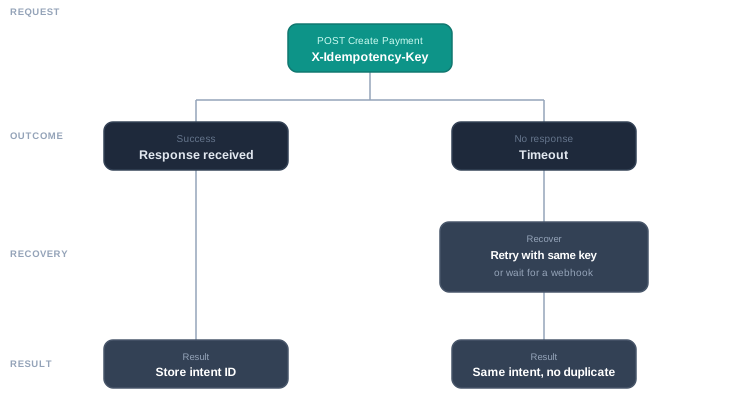
This diagram shows what happens when you create a payment. Send the request with your idempotency key. Either you get a response back (store the intent ID) or you time out. If you time out, retry with the same key or wait for a webhook. Either way, you won't create a duplicate.
Webhooks: Process Payment Updates Asynchronously
MoneyHash sends you webhook updates whenever something happens to a payment. A customer completes 3DS verification. A payment is captured. A refund goes through. These updates are your source of truth for what actually happened.
But webhooks don't always arrive in order. They might arrive late. They might arrive twice. Your system needs to handle all of this gracefully.
Verify every webhook:
Check the X-MoneyHash-Signature header on every webhook you receive. This proves it came from MoneyHash and wasn't tampered with. Reject any webhook without a valid signature.
Deduplicate webhooks:
Transaction webhooks include either a status_id or operation_id. Before you process a webhook, check if you've already processed using the status_id or operation_id (whichever is present). If you have, return 200 OK and stop. This prevents you from processing the same event twice if MoneyHash retries the webhook delivery.
Find your order:
The webhook contains the intent_id. When you created the payment and got back the intent ID, store it with your order in your database. When a webhook arrives, use the intent_id from the webhook to look up your local order. That's how you know which customer's payment this update is for.
If the webhook arrives before you've created your local order (rare timing issue), store the entire webhook payload temporarily. Then once you create the order locally, you can match it using the intent_id and process the stored webhook.
Extract the payment status:
Once you have the order, look at payment_status.status in the webhook. This field tells you what actually happened to the payment. Use this to decide what to do next.
For the full list of webhook events and best practices for handling them, see Webhook Types.
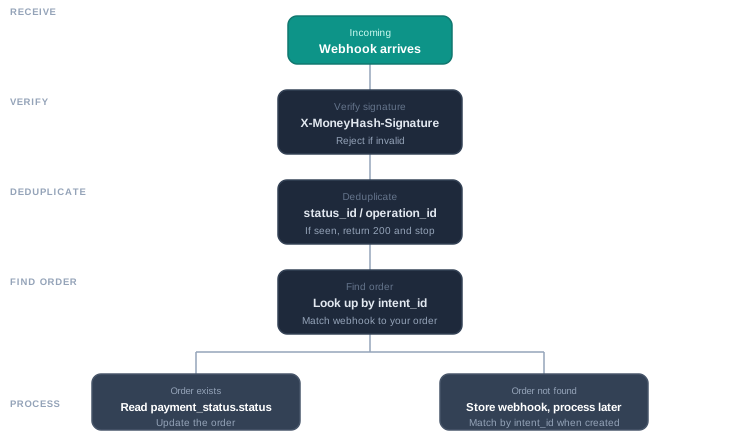
This diagram shows the webhook flow. Verify, deduplicate, find your order, and handle orphans.
Status Classification: What Each Status Means
The payment_status.status field can be one of several values. Each one tells you something different and requires a different action from you.
CAPTURED means the full payment was successfully taken from the customer. Mark the order as paid and fulfill it.
AUTHORIZED means the payment was verified and the funds are on hold, but not yet captured. This usually happens with authorize-only flows. Wait for a separate capture event, or initiate the capture yourself if that's how your integration works.
REFUNDED means money was sent back to the customer. Check the payment_status.balances field to see refund amounts in case of partial refunds, and update your ledger accordingly.
VOIDED means an authorization was released without capturing it. The customer was never charged.
AUTHORIZE_ATTEMPT_PENDING means the customer is still going through 3DS verification or a bank redirect. Do not fail the order. The payment is not complete yet, but it's also not failed. Keep waiting for the next update.
AUTHORIZE_ATTEMPT_FAILED is trickier. This means one attempt to authorize the payment failed, but that doesn't necessarily mean the order should be failed. Check intent.status to decide what to do.
If intent.status is UNPROCESSED, it means we can still try again. The payment failed at this particular payment provider, but MoneyHash might try another provider automatically, or the customer might retry. Keep the order open and allow a retry.
If intent.status is PROCESSED, CLOSED, or EXPIRED, it means we're done trying. No more retries are possible. Mark the order as failed and tell the customer why.
For the full reference of all status values and error codes, see Payment Status Codes.
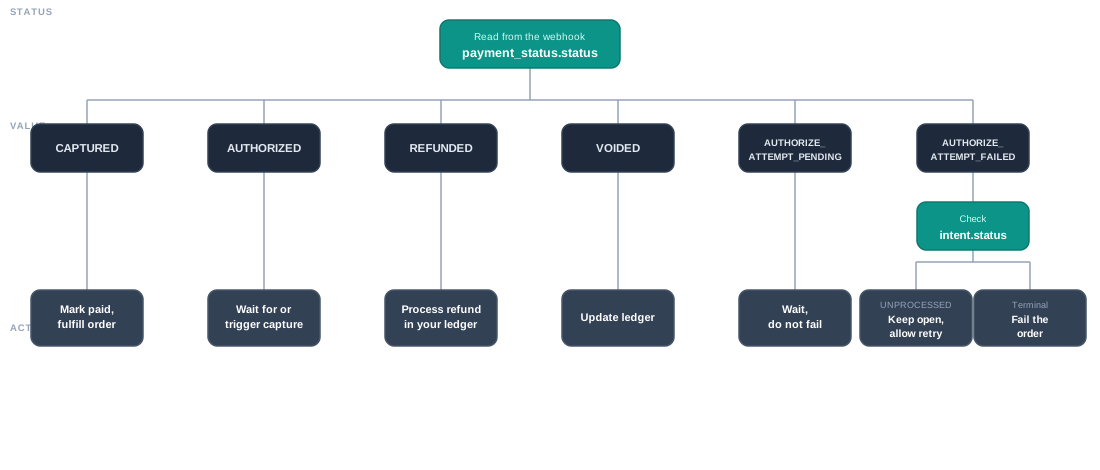
This diagram shows the decision tree for every payment status. Follow it to know what action to take based on what the payment status actually is.
Real Example: What Actually Happens
Let's walk through a real scenario so you see how all three pillars work together.
A customer tries to pay with a credit card that requires 3DS verification. Here's the sequence of events:
Your system:
- You create a payment with an idempotency key and your order ID
- MoneyHash returns an intent ID immediately
- You store the intent_id with your order in your database
First webhook arrives: payment_status.status is AUTHORIZE_ATTEMPT_PENDING
Your system receives this and sees that the authorization is pending. You deduplicate by status ID (it's the first one, so you process it). You look up your order using the intent_id from the webhook. You see that authorization is pending, so you mark the order as "awaiting customer action" and wait.
Customer completes 3DS in their browser
Second webhook arrives: payment_status.status is CAPTURED
Your system receives this. It's a new status ID, so you process it. You look up your order using the intent_id. You see that payment is captured, so you mark the order as paid and start fulfillment.
That's it. Two webhooks, two status changes, and your order went from pending to paid.
Now imagine a network hiccup:
Same scenario, but this time your HTTP response times out when creating the payment. You don't get the intent ID back. Your code should do this:
- Mark the order state as UNKNOWN_RECONCILING
- Either retry the same POST request with the same idempotency key to get the intent ID, OR wait for a webhook (it will come, and it will contain the intent ID)
- Once you have the intent ID, store it with your order and continue as normal
The payment was already created on MoneyHash's side. Your timeout didn't stop it. The webhook will still arrive and tell you when it's done.
Edge Cases and What to Do
Common Mistakes to Avoid
How to Build This
Step 1: Idempotency
Every time you call create payment, include a unique, deterministic X-Idempotency-Key. Use something like your order ID or a hash of order + timestamp. Store this with your order so you can retry safely.
Step 2: Webhook Handler
Create an HTTP endpoint that receives webhooks. For each webhook:
- Verify the signature
- Check if you've already processed this status ID
- Use the intent_id from the webhook to look up your order
- If the order doesn't exist, store the webhook for later
- If it exists, classify by payment_status.status and update your order state
- Mark the status ID as processed
- Return 200 OK
Step 3: Classification Logic
After receiving a webhook, use the payment_status.status to decide what to do. Create a simple lookup table or if/else chain:
- CAPTURED → mark paid, fulfill
- AUTHORIZED → mark authorized, wait for capture
- AUTHORIZE_ATTEMPT_PENDING → mark waiting, don't fail
- AUTHORIZE_ATTEMPT_FAILED + intent UNPROCESSED → allow retry
- AUTHORIZE_ATTEMPT_FAILED + intent terminal → fail the order
- REFUNDED → process refund
- VOIDED → update ledger
Step 4: Polling Fallback
Every few seconds, check for orders that haven't reached a terminal state yet. For each one, call GET Intent with the intent_id to refresh the status. If it's changed, rerun the classification logic. Keep polling until the payment completes or expires.
Quick Reference
| Status | Means | What to do |
|---|---|---|
| CAPTURED | Payment succeeded | Mark paid, fulfill order |
| AUTHORIZED | Payment verified, not captured | Wait for capture or trigger it |
| REFUNDED | Money sent back | Process refund in your ledger |
| VOIDED | Authorization released | Update ledger |
| AUTHORIZE_ATTEMPT_PENDING | Customer in 3DS/redirect | Wait, do not fail |
| AUTHORIZE_ATTEMPT_FAILED (intent UNPROCESSED) | One provider failed, retries possible | Allow customer/system retry |
| AUTHORIZE_ATTEMPT_FAILED (intent terminal) | No more retries | Fail the order |
| Situation | What to do |
|---|---|
| HTTP response timeout | Retry same request with same idempotency key OR wait for webhook |
| Webhook arrives for unknown order | Store it temporarily, match using intent_id when order is created |
| Webhook arrives twice | Deduplicate by status ID, process only once |
| Webhook never arrives | Poll GET Intent with intent_id every 30s until status is terminal |
| Not sure if payment can be retried | Check intent.status. If UNPROCESSED, retries are possible |
Related Pages
For more details on specific topics:
- Webhooks - what webhooks are and why you need them
- Webhook Signature - how to verify webhooks came from us
- Webhook Types - all the different payment updates you can receive
- Payment Webhook - payment webhook structure and examples
- Payment Status Codes - full reference of all status values and error codes
Updated about 2 months ago