

Programmatic Access
Overview
This page is your starting point for calling the MoneyHash API directly: the base URL, how to authenticate test vs live with your API keys, the headers to send, and how requests and responses are shaped. After reading it, you'll be able to make a correctly-formed, authenticated API call without guessing.
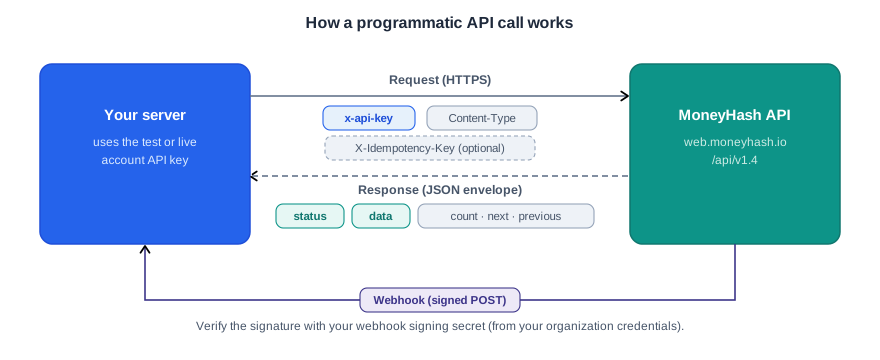
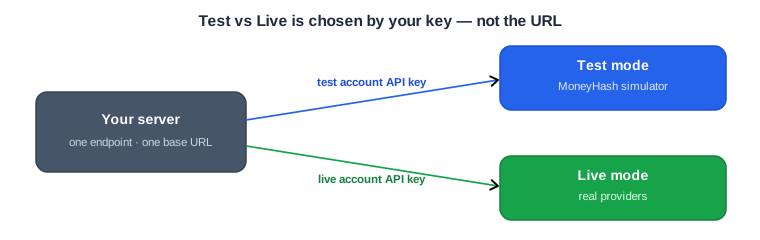
MoneyHash exposes a JSON REST API over HTTPS. Every server-to-server request is authenticated with an account API key sent in the x-api-key header, and every response comes back in a consistent JSON envelope. The environment a call runs against - Test or Live - is decided entirely by which API key you use, not by a different URL.
Prerequisites
- An account API key (test and/or live) for the account you're integrating. See Organization and Account for how keys are organized.
- A server-side environment to send requests from. API keys are secrets and must never be shipped in a frontend or mobile app - the only client-side key is the public API key, which is used by the SDKs, not the REST API.
- A tool to make HTTP requests (cURL, your backend HTTP client, etc.).
Base URL
All endpoints share a single base URL, with the API version in the path:
https://web.moneyhash.io/api/v1.4/The version segment (currently v1.4) may change as newer versions are released - always use the latest documented version rather than hardcoding assumptions around it. The same base URL serves both Test and Live; the environment is selected by your key (see below).
API keys
| Key | Used for | Where |
|---|---|---|
| Account API key | Account-level operations (payments, intents, transactions) | Your backend, in x-api-key |
| Organization API key | Organization-level endpoints (e.g. creating accounts) | Your backend, in x-api-key |
| Public API key | SDK & frontend usage only | Client (not used for REST) |
Each account has separate keys per environment - a test account API key and a live account API key (and likewise for the public key). For full detail on the key hierarchy and where each one lives, see Organization and Account.
Authentication & security
Authenticate every request by sending your key in the x-api-key header:
curl --location 'https://web.moneyhash.io/api/v1.4/payments/intent/' \
  --header 'Content-Type: application/json' \
  --header 'x-api-key: <YOUR_ACCOUNT_API_KEY>' \
  --data '<REQUEST_BODY>'
Test vs Live is determined solely by the key you use. Send your test account API key to operate in Test mode, or your live account API key to operate in Live mode - the endpoint and base URL are identical for both. There's no environment header or query flag to set; the key carries the environment.
Account vs organization endpoints. Most endpoints are account-level and use the account API key. Some endpoints are organization-level and accept only the organization API key - for example, creating an account:
curl --location 'https://web.moneyhash.io/api/v1.4/accounts/' \
  --header 'Content-Type: application/json' \
  --header 'x-api-key: <YOUR_ORGANIZATION_API_KEY>' \
  --data '<REQUEST_BODY>'
Keep all API keys on the server, store them as secure secrets, and never expose them client-side.
Headers
| Header | Required | Notes |
|---|---|---|
x-api-key | Yes | Your account (or organization) API key. Required on every request. |
Content-Type | Yes for requests with a body | Use application/json. |
X-Idempotency-Key | Optional | A v4 UUID to make write requests safe to retry. See Idempotency. |
HTTP header names are case-insensitive, so x-api-key and X-Api-Key are equivalent.
Request bodies may be sent as application/json (recommended, and used throughout this page) or application/x-www-form-urlencoded.
Request and response format
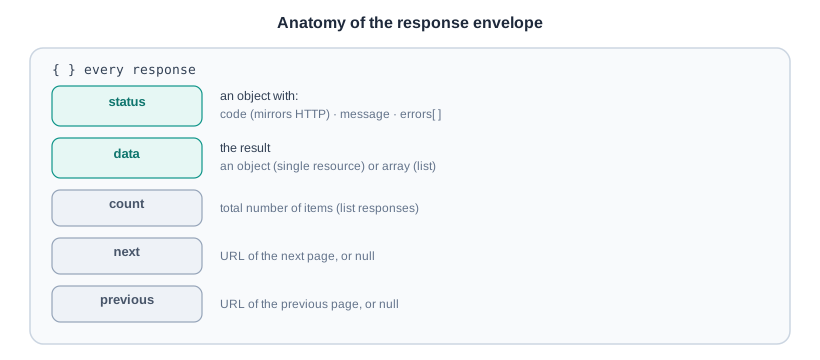
Requests and responses are JSON. Every response uses the same envelope:
{
  "status": { "code": 200, "message": "success", "errors": [] },
  "data": { },
  "count": null,
  "next": null,
  "previous": null
}status-code(mirrors the HTTP status), amessage, and anerrorsarray (empty on success).data- the result: an object for a single resource, or an array for a list.count/next/previous- pagination fields (see below);nullfor non-list responses.
The envelope never changes shape, so you can rely on the same fields for every call - check status.code first, then read data. Lists add the pagination fields; single-resource responses leave them null.
Time format
All timestamps are ISO 8601 in UTC, where the trailing Z means UTC - for example 2026-06-28T08:11:31.170743Z.
Pagination
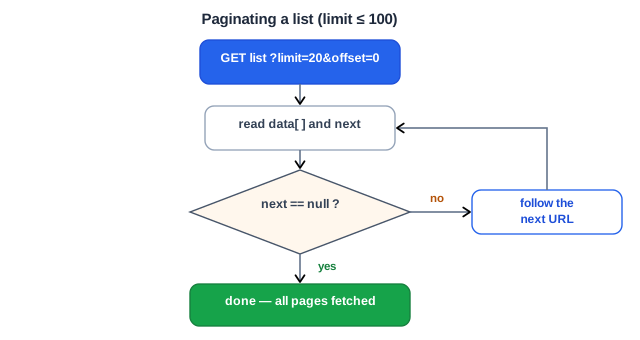
List endpoints return count (total number of items) along with next and previous - fully-qualified URLs for the adjacent pages, or null when there is no such page. Control the page with the limit and offset query parameters; limit has a maximum of 100.
https://web.moneyhash.io/api/v1.4/accounts/?limit=20&offset=20To page through a full result set, follow next until it is null — don't compute offsets yourself; next already carries the correct limit/offset (and any required tokens):
{
  "status": { "code": 200, "message": "success", "errors": [] },
  "data": [
    { "id": "Vgln9", "name": "string", "payment_methods": [] },
    { "id": "A9eEg", "name": "string", "payment_methods": ["CARD"] }
  ],
  "count": 442,
  "next": "https://web.moneyhash.io/api/v1.4/accounts/?limit=20&offset=20",
  "previous": null
}
Errors
On failure, status.code carries a 4xx code, status.errors lists what went wrong (each entry maps a field to a message), and data is empty:
{
  "status": {
    "code": 400,
    "message": "",
    "errors": [
      { "operation": "\"pay\" is not a valid choice." },
      { "webhook_url": "This field is required." }
    ]
  },
  "data": {},
  "count": null,
  "next": null,
  "previous": null
}
A missing resource returns 404:
{
  "status": { "code": 404, "message": "", "errors": [ { "detail": "Not found." } ] },
  "data": {},
  "count": null,
  "next": null,
  "previous": null
}
Status codes
The HTTP status code and status.code mirror each other, so you can check either.
| Code | Meaning | What to do |
|---|---|---|
200 | Success | Read data. |
400 | Validation / bad request | Inspect status.errors and fix the request. |
401 / 403 | Authentication / authorization failed | Check the x-api-key value and that the key matches the endpoint level (account vs organization) and environment (test vs live). |
404 | Resource not found | Check the ID and that you're in the right environment. |
429 | Too many requests (rate limited) | Back off and retry; see Rate limiting. |
5xx | Server error | Retry safely with the same X-Idempotency-Key (see Idempotency). |
If the x-api-key is missing or invalid, the request is rejected with an authentication error in the same envelope shape.
Handling errors
status.errors is an array. Most entries map a field name → message; non-field errors (like a missing resource) use a detail key. Iterate the array and surface the messages - don't rely on the top-level message string, which may be empty.
Common ones you'll meet during integration:
| Situation | What you'll see in status.errors |
|---|---|
| Currency not enabled on the account | { "amount_currency": "This currency is not supported by this account." } |
| Invalid enum value | { "operation": "\"pay\" is not a valid choice." } |
| Missing required field | { "webhook_url": "This field is required." } |
| Idempotency key isn't a UUID | { "X-Idempotency-Key": "Invalid UUID" } |
| Resource doesn't exist | { "detail": "Not found." } |
Currency and payment-method errors usually mean the account has no connection providing them - see Organization and Account connections, since currencies and methods are inherited from connections.
Idempotency
MoneyHash supports idempotent requests so that a call has the same effect whether it's sent once or many times. This protects you from accidentally creating duplicate payments, refunds, or other side effects when a request is retried after a network drop, timeout, or server error.
What is an idempotent request?
An idempotent HTTP request can be made repeatedly without causing any different effect than making it once. You opt in per request by attaching a unique key; MoneyHash remembers the first call for that key and replays its result for any repeat, instead of performing the action again.
How to make a request idempotent
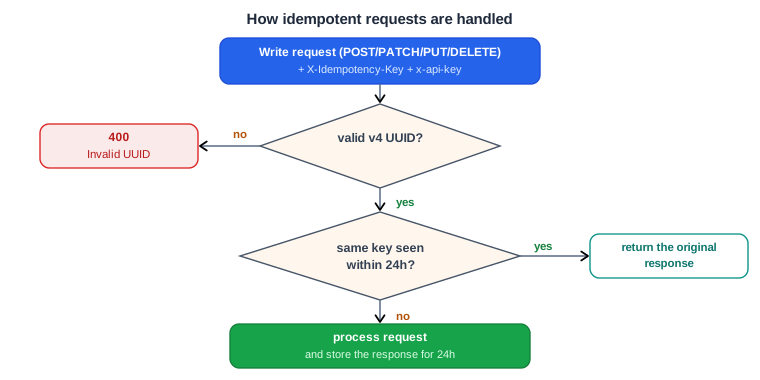
Add an X-Idempotency-Key header to your POST, PATCH, PUT, or DELETE request. The value must be a v4 UUID that you generate and that uniquely identifies that one logical operation.
curl --location 'https://web.moneyhash.io/api/v1.4/payments/intent/' \
  --header 'Content-Type: application/json' \
  --header 'x-api-key: <YOUR_ACCOUNT_API_KEY>' \
  --header 'X-Idempotency-Key: <UUID_V4>' \
  --data '<REQUEST_BODY>'
GET requests are already safe to repeat and don't need a key. The x-api-key header is always required; the X-Idempotency-Key is evaluated in combination with your x-api-key to identify the request - the same key sent under a different API key counts as a different request.
How duplicates are handled
If you resend a request with the same X-Idempotency-Key + x-api-key combination within 24 hours, MoneyHash returns the identical response to the original call - the same status and body - rather than performing the action again. This guarantees a consistent result even if the first attempt failed midway or its response never reached you.
After 24 hours, the key is no longer remembered: reusing it then is treated as a brand-new request.
Invalid keys
If the X-Idempotency-Key isn't a valid v4 UUID, the request is rejected with a 400:
{
  "status": {
    "code": 400,
    "message": "error",
    "errors": [ { "X-Idempotency-Key": "Invalid UUID" } ]
  },
  "data": {},
  "count": 1,
  "next": null,
  "previous": null
}
Best practices
- One key per logical operation. Generate a fresh v4 UUID for each distinct action (e.g. one per checkout attempt), and persist it so that any retry of that same action reuses the same key.
- A key always returns its first result. Within the 24-hour window, the same key replays the original response even if you change the request body - so use a new key whenever you intend to perform a genuinely different operation.
- Keys are scoped to your API key. The pairing is
X-Idempotency-Key+x-api-key; the same UUID under a different key (or environment) is independent. - Only needed for writes. Apply it to
POST/PATCH/PUT/DELETE;GETrequests don't require it.
Endpoints that support idempotency
- Create payment intent
- Closing an intent
- Capture a transaction
- Void a transaction
- Charge a card token
- Issue a refund
Retrying safely
If a request times out or returns a 5xx, you may not know whether it was applied. Retry the same call with the same X-Idempotency-Key - MoneyHash will either complete it once or return the original result, so you won't double-charge. Use a new UUID only for a genuinely new request.
Rate limiting
MoneyHash uses dynamic rate limiting (auto-scaling) based on your organization's and account's performance and request volume - there is no single fixed number for everyone. Align with your Solution Architect to confirm your default limit and to request an increase if you need one.
Webhook signature (concept)
MoneyHash notifies your webhook_url of payment events with a signed POST request. Always verify the signature before trusting a webhook, using your organization's webhook signing secret, which is derived from your organization credentials.
The signature header carries a timestamp (t) and one or more versioned signatures (v1, v2, v3, …):
t=1709213356,v1=30719df1…,v2=669f65e2…,v3=1d398a6951…You don't need to check all of them - verify only the latest version, which is currently v3. Newer versions may be added over time, so always use the highest one available rather than hardcoding a specific one.
For a complete, copy-paste code example of fetching the signing secret and validating the signature, see the Webhooks guide.
Code examples
A minimal authenticated request - creating a payment intent - in three forms. The required fields are amount, amount_currency, operation, and webhook_url; the key point is passing x-api-key. Note that amount is sent as a string (up to 14 digits and 2 decimal places) and amount_currency is an ISO 4217 code. (These three blocks render as tabs in ReadMe.)
curl --location 'https://web.moneyhash.io/api/v1.4/payments/intent/' \
  --header 'Content-Type: application/json' \
  --header 'x-api-key: <YOUR_ACCOUNT_API_KEY>' \
  --data '{
    "amount": "50",
    "amount_currency": "USD",
    "operation": "purchase",
    "webhook_url": "https://example.com/webhooks/moneyhash"
  }'
const res = await fetch("https://web.moneyhash.io/api/v1.4/payments/intent/", {
method: "POST",
headers: {
"Content-Type": "application/json",
"x-api-key": process.env.MONEYHASH_ACCOUNT_API_KEY,
},
body: JSON.stringify({
amount: "50",
amount_currency: "USD",
operation: "purchase",
webhook_url: "https://example.com/webhooks/moneyhash",
}),
});
const body = await res.json();
console.log(body.status.code, body.data);import os
import requests
resp = requests.post(
"https://web.moneyhash.io/api/v1.4/payments/intent/",
headers={
"Content-Type": "application/json",
"x-api-key": os.environ["MONEYHASH_ACCOUNT_API_KEY"],
},
json={
"amount": "50",
"amount_currency": "USD",
"operation": "purchase",
"webhook_url": "https://example.com/webhooks/moneyhash",
},
)
body = resp.json()
print(body["status"]["code"], body["data"])Sample response (trimmed):
{
  "status": { "code": 200, "message": "success", "errors": [] },
  "data": {
    "id": "L5XP7yJ",
    "status": "UNPROCESSED",
    "amount": 50,
    "amount_currency": "USD",
    "type": "Payin",
    "account": "4L2W2bg",
    "embed_url": "https://embed.moneyhash.io/embed/payment/L5XP7yJ",
    "state": "INTENT_FORM"
  },
  "count": 1,
  "next": null,
  "previous": null
}
Listing and paginating
Read a list endpoint and walk every page by following next until it's null.
# Fetch the first page, then request the URL in "next" until it is null.
curl --location 'https://web.moneyhash.io/api/v1.4/accounts/?limit=50' \
  --header 'x-api-key: <YOUR_ACCOUNT_API_KEY>'
let url = "https://web.moneyhash.io/api/v1.4/accounts/?limit=50";
const accounts = [];
while (url) {
const res = await fetch(url, { headers: { "x-api-key": process.env.MONEYHASH_ACCOUNT_API_KEY } });
const body = await res.json();
accounts.push(...body.data);
url = body.next; // null ends the loop
}
console.log(`fetched ${accounts.length} accounts`);import os
import requests
url = "https://web.moneyhash.io/api/v1.4/accounts/?limit=50"
headers = {"x-api-key": os.environ["MONEYHASH_ACCOUNT_API_KEY"]}
accounts = []
while url:
body = requests.get(url, headers=headers).json()
accounts.extend(body["data"])
url = body["next"] # None ends the loop
print(f"fetched {len(accounts)} accounts")Updated 3 months ago