

SDK Architecture
Overview
This page covers the MoneyHash client SDKs: which SDK to use on each platform, how to install and initialize it, where it sits inside your app, and the common checkout cases - with a diagram and a code example for every platform. For the platform model behind it (intents, keys, orchestration), see How MoneyHash Works and Programmatic Access.
Installation and Initialization
One SDK surface, five platforms. Every SDK exposes the same operations with the same names and payloads - getMethods, proceedWith, secure card fields, collect(), pay(), createCardToken() - so the code you see in one tab below maps one-to-one onto every other platform.
| Platform | Package | Install from |
|---|---|---|
| Web | @moneyhash/js-sdk | npm |
| iOS | MoneyHash | Swift Package Manager (CocoaPods also available) |
| Android | io.moneyhash:android | Maven Central |
| Flutter | moneyhash_payment | pub.dev |
| React Native | @moneyhash/reactnative-sdk | npm |
Install the SDK for your platform:
npm install @moneyhash/js-sdkXcode → File → Add Package Dependencies…
https://github.com/MoneyHash/moneyhash-spm// build.gradle.kts
dependencies {
implementation("io.moneyhash:android:<LATEST_VERSION>")
}flutter pub add moneyhash_paymentnpm install @moneyhash/reactnative-sdkThen initialize it - one builder call on every platform, holding only your public API key (the secret key stays on your server):
import MoneyHash from "@moneyhash/js-sdk/headless";

const moneyHash = new MoneyHash({
  type: "payment", // or "payout"
  publicApiKey: "<YOUR_PUBLIC_API_KEY>",
});
import MoneyHash
let moneyHash = MoneyHashSDKBuilder()
.setPublicKey("<YOUR_PUBLIC_API_KEY>")
.build()import com.moneyhash.sdk.android.core.MoneyHashSDKBuilder
val moneyHash = MoneyHashSDKBuilder
.setPublicKey("<YOUR_PUBLIC_API_KEY>")
.build()import 'package:moneyhash_payment/moneyhash_payment.dart';
final moneyHash = MoneyHashSDKBuilder().build();
moneyHash.setPublicKey("<YOUR_PUBLIC_API_KEY>");import { MoneyHashSDKBuilder } from "@moneyhash/reactnative-sdk";
const moneyHash = MoneyHashSDKBuilder.build();
moneyHash.setPublicKey("<YOUR_PUBLIC_API_KEY>");Inside your app, the SDK owns two things: the calls that drive the intent (your server creates the intent and hands the intent_id to the app - see Programmatic Access), and the secure fields - card inputs rendered in isolated containers (iframes on the web, native secure views on mobile) that send card data directly to the MoneyHash vault, so raw card values never enter your code and your app stays out of PCI scope.
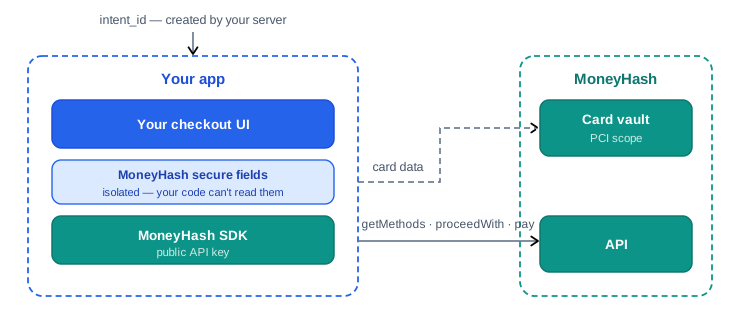
The sections below walk through the common cases in the order a checkout uses them.
Intent States
Every SDK call that moves a payment forward - proceedWith, submitForm, submitCardCVV, pay, renderUrl - resolves with the intent's updated details, and those details carry two things: the current state and a typed state payload with everything that state needs to render. Your checkout is a state machine renderer: render the current state, invoke that state's one action, replace your local state with whatever comes back. Never assume a fixed sequence - the same pay() call can land on IntentProcessed for one card and UrlToRender for another, and your code should not care why.
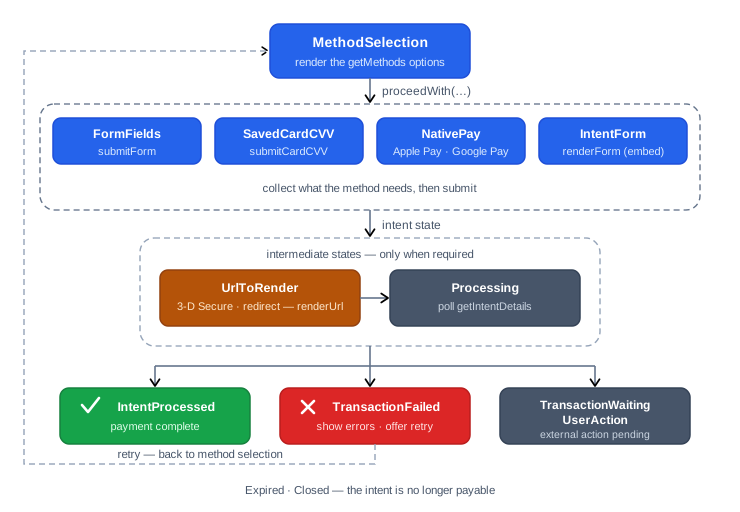
Engineering notes on the machine:
- The response is the source of truth. Every mutating call returns the next state - there is nothing to track between calls. This also makes recovery trivial: after process death, app relaunch, or a dropped connection, call
getIntentDetails(intentId)and render whatever comes back. Processingis transient. It appears while a provider is finalizing asynchronously - pollgetIntentDetailsuntil the state changes, and show your own processing UI meanwhile.UrlToRenderis delegated, not handled by you. The payload'srenderStrategysays how the challenge must be presented (iframe·popup·redirecton the web; an in-app web-view on mobile). Hand the state torenderUrland the SDK runs the challenge, detects completion, and resolves with the resulting state.- Failure is not the end of the intent.
TransactionFailedcarries optionalrecommendedMethodsso you can re-render method selection immediately;resetSelectedMethodsends the intent back toMethodSelectionfor another attempt. OnlyExpiredandClosedare dead ends that need a new intent from your server.
What each state delivers, and what it needs from you:
| State | You receive (state payload) | What you do |
|---|---|---|
MethodSelection | methods - payment methods, express methods, saved cards, customer balances | Render your method list; attach the pick with proceedWith. |
FormFields | tokenizeCardInfo (card form config), billingFields / shippingFields - typed InputField schemas (type, name, validation) | Render the card form and/or dynamic fields from the schemas; submit with submitForm (for cards: collect() then pay()). |
InstallmentPlans | plans - issuer, fees, and terms per plan | Render the plans; confirm with selectInstallmentPlan. |
SavedCardCVV | cvvField schema + cardTokenData (brand, last digits) | Collect the CVV for the saved card; submit with submitCardCVV. |
NativePay | nativePayData - wallet configuration (method id, networks, amount, country) | Present the Apple Pay / Google Pay sheet; generate the receipt and submit it. |
IntentForm | - | Call renderForm: the MoneyHash-hosted embed takes over collection and returns the final state. |
UrlToRender | url + renderStrategy (iframe · popup · redirect) | Call renderUrl; the SDK runs the 3-D Secure / redirect challenge and resolves with the next state. |
Processing | - | Transient - show your processing UI and poll getIntentDetails until the state changes. |
IntentProcessed | - | Terminal ✓ - show the success confirmation. |
TransactionFailed | recommendedMethods (optional) | Terminal for this attempt - show the error; re-render methods from recommendedMethods, or resetSelectedMethod to retry. |
TransactionWaitingUserAction | - | Show the pending external action (e.g. offline confirmation); resolve later via getIntentDetails or your webhook. |
Expired / Closed | - | The intent is no longer payable - create a new intent from your server. |
CardIntentSuccessful / CardIntentFailed | - | The outcome of createCardToken when saving a card - confirm, or offer to retry tokenization. |
Naming differs only in casing: the JavaScript SDK reports states in upper snake case (METHOD_SELECTION, INTENT_PROCESSED), while the mobile SDKs use the Pascal case names shown above.
Get Available Methods
getMethods is the entry point of a headless integration. Pass an intent_id created by your server - or, before any intent exists, just a currency and amount resolved against your public key - and it returns everything your checkout can render: the available payment methods, express methods (Apple Pay, Google Pay), the customer's saved cards, and customer balances. You render those in your own UI, with your own design, and when the customer picks one you attach the selection to the intent with proceedWith.
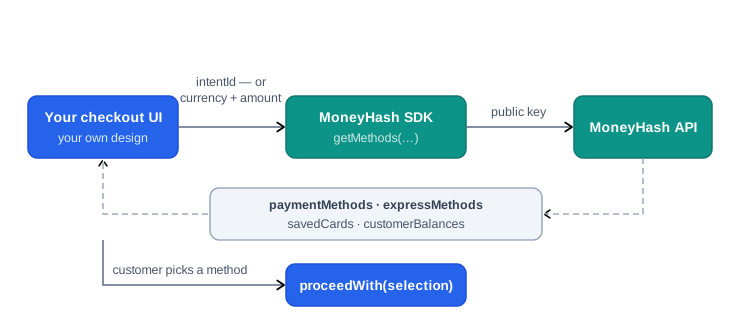
getMethods comes in two distinct variants, and the difference is whether an intent exists yet:
With intentId | Without an intent (public key) | |
|---|---|---|
| Requires | An intent already created by your server | Only your public API key |
| Inputs | intentId (+ intent type on mobile) - nothing else is accepted | currency (required) + five optional parameters |
| What it reflects | Exactly what that intent can accept - its amount, currency, customer, and flow were fixed at creation | What a payment with the parameters you pass would accept - nothing is created server-side |
| Next step | proceedWith on the same intent | Create the real intent on your server, then proceedWith |
| Use it for | The standard checkout page | Showing payment options earlier in the funnel, before committing to an intent |
With an intent
Your server has already created the intent, so everything that shapes the method list - amount, currency, customer, flow - is already on it. That's why this variant takes no other parameters: the response is authoritative for this exact payment, and the selection you attach with proceedWith lands on the same intent.
const methods = await moneyHash.getMethods({ intentId: "<YOUR_INTENT_ID>" });

const { paymentMethods, expressMethods, savedCards, customerBalances } =
  methods;
let methods = try await moneyHash.getMethods(
intentId: "<YOUR_INTENT_ID>",
intentType: .payment
)val methods = moneyHash.getMethods(
intentId = "<YOUR_INTENT_ID>",
intentType = IntentType.Payment
)final methods = await moneyHash.getMethods(
GetMethodsParams.withIntent("<YOUR_INTENT_ID>", IntentType.payment),
);const methods = await moneyHash.getMethods(
"<YOUR_INTENT_ID>",
IntentType.Payment
);Without an intent
No intent exists yet - the SDK resolves the question "what could this customer pay with?" against your public API key and the parameters you pass. Use it to render payment options before committing to an intent: showing methods or express wallets earlier in the funnel, personalizing the list with a returning customer's saved cards, or checking method availability for a given amount - all without creating throwaway intents just to display options. Once the customer picks, create the real intent from your server and continue with proceedWith.
currency is the only required parameter - the five optional parameters shape what comes back:
| Parameter | Type | What it does |
|---|---|---|
amount | number | The amount to resolve against - method availability and any amount-based flow rules apply to this value. |
customer | customer id | Scopes the response to a customer: their savedCards and customerBalances are included alongside the methods. Without it, both come back empty. |
flowId | flow id | Resolves against a specific flow from your dashboard instead of your account's payment defaults - that flow's method configuration and routing rules decide the list. |
operation | purchase · authorize | Restricts the list to methods that support the operation - authorize (capture later) is not supported by every method. |
customFields | map of string / number / boolean | Feeds your flow's custom-field conditions, so dynamic-checkout rules keyed on order attributes (e.g. order_type) apply to the returned methods. |
Because nothing was created, the response is a preview, not a reservation: when you later create the intent, create it with the same currency, amount, and flow so the preview holds.
const methods = await moneyHash.getMethods({
  currency: "SAR",                       // required
  amount: 100,                           // optional
  customer: "<CUSTOMER_ID>",             // optional - include saved cards & balances
  flowId: "<YOUR_FLOW_ID>",              // optional - resolve against a specific flow
  operation: "purchase",                 // optional - "purchase" | "authorize"
  customFields: { order_type: "food" },  // optional - feeds flow conditions
});
let methods = try await moneyHash.getMethods(
currency: "SAR", // required
amount: 100, // optional
customer: "<CUSTOMER_ID>", // optional - include saved cards & balances
flowId: "<YOUR_FLOW_ID>", // optional - resolve against a specific flow
operation: .purchase, // optional - .purchase | .authorize
customFields: ["order_type": .string(value: "food")] // optional
)val methods = moneyHash.getMethods(
currency = "SAR", // required
amount = 100.0, // optional
customerId = "<CUSTOMER_ID>", // optional - include saved cards & balances
flowId = "<YOUR_FLOW_ID>", // optional - resolve against a specific flow
operation = IntentOperation.PURCHASE, // optional - PURCHASE | AUTHORIZE
customFields = mapOf("order_type" to CustomFieldValue.StringValue("food")) // optional
)final methods = await moneyHash.getMethods(
GetMethodsParams.withCurrency(
currency: "SAR", // required
amount: 100, // optional
customer: "<CUSTOMER_ID>", // optional - include saved cards & balances
flowId: "<YOUR_FLOW_ID>", // optional - resolve against a specific flow
operation: IntentOperation.purchase, // optional - purchase | authorize
customFields: {"order_type": CustomFieldValue.string("food")}, // optional
),
);const methods = await moneyHash.getMethods({
currency: "SAR", // required
amount: 100, // optional
customer: "<CUSTOMER_ID>", // optional - include saved cards & balances
flowId: "<YOUR_FLOW_ID>", // optional - resolve against a specific flow
operation: "purchase", // optional - "purchase" | "authorize"
customFields: { order_type: "food" }, // optional - feeds flow conditions
});Proceed With a Method
Once the customer picks an option from the list you rendered, proceedWith attaches that selection to the intent - and this is the moment the state machine starts moving: the response carries the next intent state (plus updated details), and your UI renders it. It is one call for every kind of selection; what changes is the selection type. On the web the call is proceedWith({ type, id }); on mobile it is proceedWithMethod(...) with a MethodType enum - same types, same behavior.
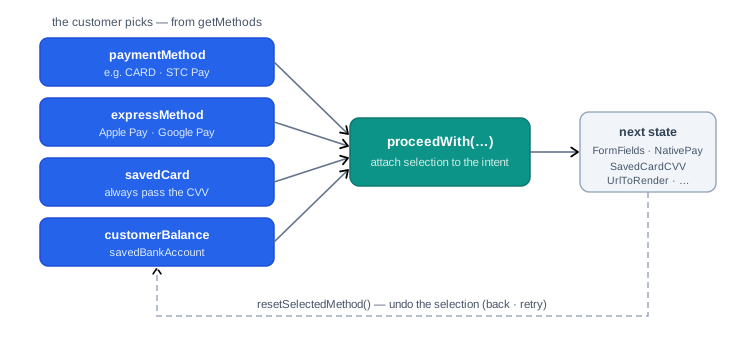
| Selection type | id you pass | Typical next state |
|---|---|---|
paymentMethod (web: type: "method") | A method id from paymentMethods, e.g. CARD | FormFields to collect card/billing data - or UrlToRender for redirect methods |
expressMethod (web: type: "method") | The Apple Pay / Google Pay method id from expressMethods | NativePay - present the wallet sheet |
savedCard | A card id from savedCards | Direct submission - always pass the CVV in the method metadata |
customerBalance | A balance id from customerBalances | Direct processing - pass useWalletBalance to split between the balance and another method |
savedBankAccount | A bank account id from the saved bank accounts | Bank account flows |
Two details worth knowing:
- The response is your next screen. The web SDK resolves with updated
IntentDetails; the mobile SDKs resolve with a result carryingdetails(and refreshedmethodswhen relevant) - readdetails.intentStateand render it. - Changing the selection is a first-class move.
resetSelectedMethod(intentId)clears the selection and returns the intent toMethodSelection- wire it to your "back" button, and to the retry action onTransactionFailed.
// Regular payment method
let intentDetails = await moneyHash.proceedWith({
  intentId: "<YOUR_INTENT_ID>",
  type: "method",
  id: "CARD",                    // from methods.paymentMethods / expressMethods
});

// Saved card - always pass the CVV
intentDetails = await moneyHash.proceedWith({
  intentId: "<YOUR_INTENT_ID>",
  type: "savedCard",
  id: "<CARD_ID>",               // from methods.savedCards
  metaData: { cvv: "123" },
});

// Customer balance - optionally split with another method
intentDetails = await moneyHash.proceedWith({
  intentId: "<YOUR_INTENT_ID>",
  type: "customerBalance",
  id: "<BALANCE_ID>",
  useWalletBalance: true,
});

// Undo the selection (back / retry)
await moneyHash.resetSelectedMethod("<YOUR_INTENT_ID>");
// Regular payment method
var result = try await moneyHash.proceedWithMethod(
intentId: "<YOUR_INTENT_ID>",
intentType: .payment,
selectedMethodId: "CARD", // from methods.paymentMethods
methodType: .paymentMethod,
metaData: nil,
useWalletBalance: nil,
installmentPlanData: nil
)
// Saved card — always pass the CVV
result = try await moneyHash.proceedWithMethod(
intentId: "<YOUR_INTENT_ID>",
intentType: .payment,
selectedMethodId: "<CARD_ID>", // from methods.savedCards
methodType: .savedCard,
metaData: IntentMethodMetaData(cvv: "123"),
useWalletBalance: nil,
installmentPlanData: nil
)
// result.details?.intentState → render the next state// Regular payment method
var result = moneyHash.proceedWithMethod(
intentId = "<YOUR_INTENT_ID>",
intentType = IntentType.Payment,
selectedMethodId = "CARD", // from methods.paymentMethods
methodType = MethodType.PAYMENT_METHOD,
methodMetaData = null
)
// Saved card — always pass the CVV
result = moneyHash.proceedWithMethod(
intentId = "<YOUR_INTENT_ID>",
intentType = IntentType.Payment,
selectedMethodId = "<CARD_ID>", // from methods.savedCards
methodType = MethodType.SAVE_CARD,
methodMetaData = MethodMetaData(cvv = "123")
)
// result.details?.intentState → render the next state// Regular payment method
var result = await moneyHash.proceedWithMethod(
"<YOUR_INTENT_ID>",
IntentType.payment,
"CARD", // from methods.paymentMethods
MethodType.paymentMethod,
null, // methodMetaData
null, // useWalletBalance
);
// Saved card — always pass the CVV
result = await moneyHash.proceedWithMethod(
"<YOUR_INTENT_ID>",
IntentType.payment,
"<CARD_ID>", // from methods.savedCards
MethodType.savedCard,
MethodMetaData(cvv: "123"),
null,
);
// result.details?.intentState → render the next state// Regular payment method
let result = await moneyHash.proceedWithMethod(
"<YOUR_INTENT_ID>",
IntentType.Payment,
"CARD", // from methods.paymentMethods
MethodType.PaymentMethod
);
// Saved card — always pass the CVV
result = await moneyHash.proceedWithMethod(
"<YOUR_INTENT_ID>",
IntentType.Payment,
"<CARD_ID>", // from methods.savedCards
MethodType.SavedCard,
{ cvv: "123" }
);
// result.details?.intentState → render the next stateGet Intent Details
getIntentDetails is the read side of the state machine: it returns the same IntentDetails object every mutating call resolves with - the current state and its payload, the intent's amount, currency and status, the selected method, and the transaction (including decline details) once one exists - without changing anything on the intent. You don't need it on the happy path, because every mutating call already hands you fresh details; it exists for the moments your local copy of the state can no longer be trusted.
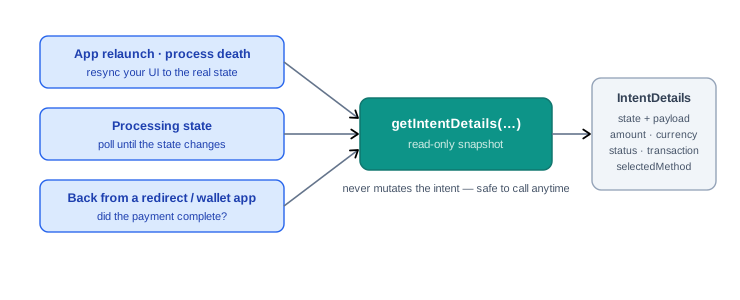
Call it when:
- Resuming a checkout you didn't just create - the screen opens with an existing
intent_id: fetch the details first and render whatever state the intent is actually in. - Recovering - app relaunch, process death, or a submit whose response never arrived: re-fetch instead of guessing whether the call landed.
- Polling
Processing- the one state that resolves on its own; poll until the state changes. - Returning from an external app or redirect - after a wallet, bank app, or 3-D Secure page bounced the customer out of your app, ask what actually happened before showing a result.
- After
TransactionWaitingUserAction- re-check once the customer reports completing the external step (your server's webhook remains the authoritative signal).
const intentDetails = await moneyHash.getIntentDetails("<YOUR_INTENT_ID>");

// intentDetails.state        → current state to render
// intentDetails.stateDetails → that state's payload
// intentDetails.intent       → amount · currency · status
// intentDetails.transaction  → after processing, incl. decline details
let details = try await moneyHash.getIntentDetails(
intentId: "<YOUR_INTENT_ID>",
intentType: .payment
)
// details.intentState → current state + payload
// details.intent · details.transaction · details.selectedMethodval details = moneyHash.getIntentDetails(
intentId = "<YOUR_INTENT_ID>",
intentType = IntentType.Payment
)
// details?.intentState → current state + payload
// details?.intent · details?.transaction · details?.selectedMethodfinal details = await moneyHash.getIntentDetails(
"<YOUR_INTENT_ID>",
IntentType.payment,
);
// details.intentState → current state + payload
// details.intent · details.transaction · details.selectedMethodconst details = await moneyHash.getIntentDetails(
"<YOUR_INTENT_ID>",
IntentType.Payment
);
// details.intentState → current state + payload
// details.intent · details.transaction · details.selectedMethodCollect Card Information
Card input runs through secure fields the SDK owns. You compose the five fields - card number, card holder name, expiry month, expiry year, CVV - into your own layout and style them to match your design, but each one renders inside an isolated container your app cannot read: an iframe on the web, a native secure view on mobile. The card form gives you per-field validation state and card-brand detection as the customer types. Calling collect() transmits the raw values from those isolated fields directly to the MoneyHash vault over TLS and resolves with tokenized cardData - a reference that is safe to hold in memory and pass to pay() or createCardToken(). See Build Card Form page to build a fully custom card form with the MoneyHash SDKs.
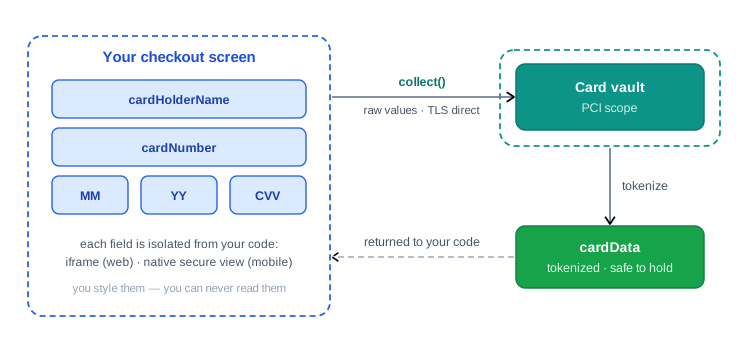
const elements = moneyHash.elements({ styles: { /* shared styles */ } });

["cardHolderName", "cardNumber", "expiryMonth", "expiryYear", "cvv"]
  .forEach((elementType) => {
    elements
      .create({
        elementType,
        elementOptions: { selector: "#" + elementType },
      })
      .mount(); // renders inside a MoneyHash-hosted iframe
  });

// Raw values go straight to the vault; you get a tokenized reference
const cardData = await moneyHash.cardForm.collect();
// Build the collector — one handler per field for validation state
let cardForm = CardFormBuilder()
.setCardNumberField { state in /* update UI */ }
.setCVVField { state in /* update UI */ }
.setExpireMonthField { state in /* update UI */ }
.setExpireYearField { state in /* update UI */ }
.setCardHolderNameField { state in /* update UI */ }
.setCardBrandChangeHandler { brand in /* show brand icon */ }
.build()
// Render secure fields in your layout (SwiftUI)
SecureTextField(cardFormCollector: cardForm, type: .cardNumber,
placeholder: { Text("Card number") })
// … .cvv, .expireMonth, .expireYear, .cardHolderName
// Collect — returns tokenized VaultData
let cardData = try await cardForm.collect()// Build the collector — one listener per field for validation state
val cardForm = CardFormBuilder()
.setCardNumberField { state -> /* update UI */ }
.setCVVField { state -> /* update UI */ }
.setExpireMonthField { state -> /* update UI */ }
.setExpireYearField { state -> /* update UI */ }
.setCardHolderNameField { state -> /* update UI */ }
.build()
// Render secure fields in Compose
SecureTextField(
cardForm = cardForm,
type = FieldType.CARD_NUMBER,
label = { Text("Card number") },
)
// … CVV, EXPIRE_MONTH, EXPIRE_YEAR, CARD_HOLDER_NAME
// Collect — returns tokenized VaultData
val cardData = cardForm.collect()// Build the collector — one handler per field for validation state
final cardForm = CardFormBuilder()
.setCardNumberField((state) { /* update UI */ })
.setCVVField((state) { /* update UI */ })
.setExpireMonthField((state) { /* update UI */ })
.setExpireYearField((state) { /* update UI */ })
.setCardHolderNameField((state) { /* update UI */ })
.build();
// Render secure fields in your widget tree
SecureTextField(
cardForm: cardForm,
type: CardFieldType.cardNumber,
label: "Card number",
),
// … cvv, expiryMonth, expiryYear, cardHolderName
// Collect — returns tokenized VaultData
final cardData = await cardForm.collect();const { cardFormRef, collect, isValid } = useSecureCardForm();
<SecureCardForm ref={cardFormRef}>
<SecureTextField name="cardHolderName" placeholder="Name on card" />
<SecureTextField name="cardNumber" placeholder="#### #### #### ####" />
<SecureTextField name="expiryMonth" placeholder="MM" />
<SecureTextField name="expiryYear" placeholder="YY" />
<SecureTextField name="cvv" maskCvv placeholder="***" />
</SecureCardForm>
// Collect — returns tokenized VaultData
const cardData = await collect();Save Card For Future Use
To store a card without charging it, your server first creates a card intent (a Save Card intent) and passes its id to the app. The app collects the card through the same secure fields, then calls createCardToken with the card intent id and the collected cardData - the vault tokenizes the card and stores it against the customer, and the returned state tells you whether an extra verification step (such as a 3-D Secure URL) must be rendered. From then on, getMethods returns the card under savedCards, and paying with it is a single proceedWith call of type savedCard (always passing the CVV in the method metadata). To save a card during a payment instead, simply pass saveCard: true to pay().
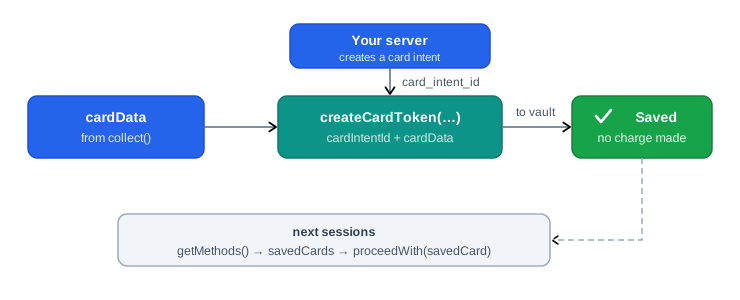
const cardData = await moneyHash.cardForm.collect();

const state = await moneyHash.cardForm.createCardToken({
  cardIntentId: "<YOUR_CARD_INTENT_ID>", // created by your server
  cardData,
});

// Later - pay with the saved card
await moneyHash.proceedWith({
  intentId: "<YOUR_INTENT_ID>",
  type: "savedCard",
  id: "<CARD_ID>",             // from getMethods().savedCards
  metaData: { cvv: "<CVV>" },  // always pass the CVV
});
let cardData = try await cardForm.collect()
let state = try await cardForm.createCardToken(
cardIntentId: "<YOUR_CARD_INTENT_ID>", // created by your server
cardData: cardData!
)val cardData = cardForm.collect()
val state = cardForm.createCardToken(
cardIntentId = "<YOUR_CARD_INTENT_ID>", // created by your server
cardData = requireNotNull(cardData)
)final cardData = await cardForm.collect();
final state = await cardForm.createCardToken(
"<YOUR_CARD_INTENT_ID>", // created by your server
cardData!,
);const { cardFormRef, collect, createCardToken } = useSecureCardForm();
const cardData = await collect();
const state = await createCardToken({
cardIntentId: "<YOUR_CARD_INTENT_ID>", // created by your server
cardData,
});Pay Using Card Information
Once the card is collected, pay() submits everything in one call: the intent id, the tokenized cardData, an optional saveCard flag (tokenize for future use while charging), and optional billing and shipping data. It resolves with the updated intent details, and the state tells you how to finish: when no further authentication is needed the intent lands on processed and the transaction is complete; when the issuer requires 3-D Secure or a redirect, the state carries a URL to render - hand it to renderUrl and the SDK runs the challenge and returns the final state. Your code never branches on gateway specifics; it only reacts to intent states.
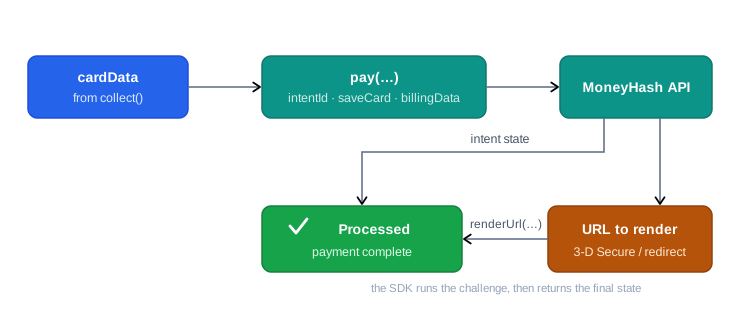
const cardData = await moneyHash.cardForm.collect();

const intentDetails = await moneyHash.cardForm.pay({
  intentId: "<YOUR_INTENT_ID>",
  cardData,
  saveCard: true,   // optional - tokenize for future use
  billingData: {},  // optional
});

// intentDetails.state → processed, or a URL to render for 3-D Secure
let cardData = try await cardForm.collect()
let intentDetails = try await cardForm.pay(
intentId: "<YOUR_INTENT_ID>",
cardData: cardData!,
saveCard: true,
billingData: nil,
shippingData: nil,
installmentPlanData: nil
)val cardData = cardForm.collect()
val intentDetails = cardForm.pay(
intentId = "<YOUR_INTENT_ID>",
cardData = requireNotNull(cardData),
saveCard = true,
billingData = null,
shippingData = null
)final cardData = await cardForm.collect();
final intentDetails = await cardForm.pay(
"<YOUR_INTENT_ID>", // intentId
cardData!,
true, // saveCard
null, // billingData
null, // shippingData
);const { cardFormRef, collect, pay } = useSecureCardForm();
const cardData = await collect();
const intentDetails = await pay({
intentId: "<YOUR_INTENT_ID>",
cardData,
saveCard: true,
});BIN Lookup
BIN lookup turns the first digits of a card - or a wallet receipt - into card metadata before you submit the payment: the returned LookupData carries the card's brand, card type (credit/debit), issuer, issuer country, and product. Use it to show the right brand icon as the customer types, decide which installment plans or methods to offer, and feed routing decisions with real card intelligence.
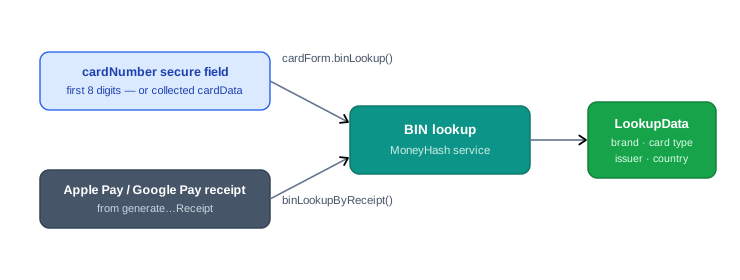
Card BIN lookup
Runs against the secure fields: call it with no arguments to look up whatever is currently typed (it works from the first 8 digits, so you can fire it from the card number field's change event), or pass previously collected cardData.
// Look up as soon as the customer has typed 8 digits
cardNumber.on("changeInput", ({ length }) => {
  if (length === 8) {
    moneyHash.cardForm.binLookup().then(handleLookup);
  }
});

// Or with collected card data
const cardData = await moneyHash.cardForm.collect();
const lookup = await moneyHash.cardForm.binLookup({ cardData });
// With the values currently typed in the secure fields
let lookup = try await cardForm.binLookup()
// Or with collected card data
let lookup = try await cardForm.binLookup(cardData: cardData)
// lookup.brand · lookup.cardType · lookup.issuer · lookup.issuerCountry// With the values currently typed in the secure fields
val lookup = cardForm.binLookup()
// Or with collected card data
val lookup = cardForm.binLookup(cardData = cardData)// With the values currently typed in the secure fields
final lookup = await cardForm.binLookup();
// Or with collected card data
final lookup = await cardForm.binLookup(cardData);const { binLookup } = useSecureCardForm();
// With the values currently typed in the secure fields
const lookup = await binLookup();
// Or with collected card data
const lookup = await binLookup(cardData);Receipt BIN lookup (Apple Pay & Google Pay)
Wallet payments never expose a typeable card number, so the lookup runs on the receipt instead: generate the receipt (generateApplePayReceipt / generateGooglePayReceipt), pass it with the express method id from nativePayData, and you get the same LookupData for the card inside the wallet - before submitting the payment. On the web, binLookupByReceipt accepts both Apple Pay and Google Pay receipts; on mobile, Apple Pay receipt lookup runs on iOS devices (the Android SDK doesn't expose a receipt lookup - use the card BIN lookup above).
const lookup = await moneyHash.binLookupByReceipt({
  nativeReceiptData, // Apple Pay or Google Pay receipt
  methodId: "<METHOD_ID>", // express method id from nativePayData
  flowId: "<YOUR_FLOW_ID>", // optional
});
let lookup = try await moneyHash.getApplePayBinLookup(
receipt: receipt, // from generateApplePayReceipt
methodID: "<METHOD_ID>", // Apple Pay method id
flowId: nil
)// iOS devices only
final lookup = await moneyHash.getApplePayBinLookup(
receipt, // from generateApplePayReceipt
"<METHOD_ID>",
);// iOS devices only
const lookup = await moneyHash.getApplePayBinLookup({
receipt, // from generateApplePayReceipt
methodID: "<METHOD_ID>",
});Updated 2 months ago