

Transaction Anomalies
A transaction anomaly is a situation where a transaction's recorded status conflicts with later information received from the payment provider. For example, a transaction may be marked FAILED while the provider later confirms it was actually successful. MoneyHash detects these mismatches in near real time and notifies you so your systems can react.
This page covers the developer-facing parts of the feature: the webhooks MoneyHash sends when an anomaly is detected and resolved, and the API for reading a transaction's resolution history.
Key concepts
A few terms used throughout this page:
- Transaction anomaly - a conflict between a transaction's recorded status and later provider information.
- Provider pull - a direct request to the provider to retrieve the latest transaction status. In cases such as a post-success failure signal, the provider pull is treated as the source of truth. A conflicting webhook alone does not confirm that a transaction failed.
- Resolution - the action taken to close an anomaly, either by correcting the transaction status or by marking the anomaly resolved without a status change.
There are three anomaly types, carried in the anomaly_type field: post_failure_success, duplicate_success, and post_success_failure.
Webhooks
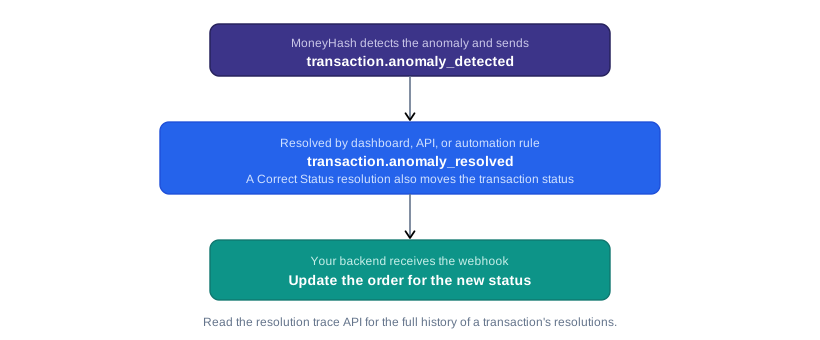
MoneyHash can notify you the moment an anomaly is detected and again when it is resolved.
Anomaly webhooks are not sent by default. Contact the MoneyHash team to enable them for your account.
Anomaly detected
When an anomaly is detected, MoneyHash sends a transaction.anomaly_detected webhook with the anomaly details. This fires for every anomaly, regardless of how it is later resolved or whether automation is turned on.
{
  "type": "transaction.anomaly_detected",
  "data": {
    "anomaly_id": "K9x7pQa",
    "transaction_id": "1f7f4df8-3e4f-4d91-9c3f-2c8a6e8f91b2",
    "anomaly_type": "post_failure_success",
    "severity": "critical",
    "detected_at": "2026-06-02T09:15:30.123456+00:00",
    "mh_status": "FAILED",
    "provider_reported_status": "SUCCESS",
    "provider_evidence": {
      "status": "SUCCESS",
      "provider_reference": "abc123",
      "amount": 1000,
      "currency": "EGP"
    }
  }
}The provider_evidence object contains the raw provider evidence stored by MoneyHash. Its structure may vary depending on the provider.
Resolving the anomaly
Once you receive a transaction.anomaly_detected webhook, you can resolve the anomaly programmatically using the Resolve Anomaly API.
Anomaly resolved
When an anomaly is resolved, MoneyHash sends a transaction.anomaly_resolved webhook. This fires regardless of how the anomaly was resolved, whether from the dashboard, through the API, or by an automation rule.
{
  "type": "transaction.anomaly_resolved",
  "data": {
    "anomaly_id": "K9x7pQa",
    "transaction_id": "1f7f4df8-3e4f-4d91-9c3f-2c8a6e8f91b2",
    "anomaly_type": "post_failure_success",
    "resolution_action": "CORRECT_STATUS",
    "resolved_at": "2026-06-02T09:22:11.654321+00:00",
    "resolved_by": "[email protected]",
    "original_status": "FAILED",
    "corrected_status": "SUCCESSFUL",
    "resolution_notes": "Provider confirmed the payment succeeded; MoneyHash status corrected."
  }
}If a merchant automates the Correct Status action, this webhook is how your systems learn that a transaction's status has moved, for example from FAILED to SUCCESSFUL. Make sure your webhook handling can process a status change that arrives after you already considered the transaction complete.
Correcting the status does not issue a refund. It brings the MoneyHash record in line with the provider so the transaction becomes refundable. Whether to refund remains your decision and is a separate step.
Resolution Trace API
Every resolved anomaly writes a resolution trace on its transaction, recording what action was taken, how it was resolved, and when. You can read a transaction's resolution traces with the endpoint below.
Endpoint
Headers
Pass your API key in the X-API-Key header:
accept: application/json
X-API-Key: <your-api-key>
Response
The data field is an array, since a transaction can have more than one resolution trace. When a transaction has no resolution traces, data is an empty array.
{
  "status": {
    "code": 200,
    "message": "success",
    "errors": []
  },
  "data": [
    {
      "id": "wA9eY9m",
      "anomaly_id": "zgEQ6jg",
      "anomaly_type": "post_success_failure",
      "action_taken": "MARK_RESOLVED",
      "previous_status": "SUCCESSFUL",
      "new_status": "SUCCESSFUL",
      "resolution_method": "DASHBOARD",
      "anomaly_type_config_id": null,
      "anomaly_type_name": null,
      "rule_id": null,
      "rule_name": null,
      "resolved_by": {
        "id": 300,
        "email": "[email protected]"
      },
      "notes": "",
      "resolved_at": "2026-09-15T14:39:47.398189Z"
    }
  ]
}
Fields
| Field | Description |
|---|---|
id | The ID of the resolution trace. |
anomaly_id | The ID of the anomaly this trace resolved. |
anomaly_type | The anomaly type: post_failure_success, duplicate_success, or post_success_failure. |
action_taken | The action applied to resolve the anomaly, for example CORRECT_STATUS or MARK_RESOLVED. |
previous_status | The transaction status before resolution. |
new_status | The transaction status after resolution. For a mark-resolved action, this matches previous_status. |
resolution_method | How the anomaly was resolved: DASHBOARD, API, or RULE. |
anomaly_type_config_id | For a rule-based resolution, the ID of the anomaly type configuration. null otherwise. |
anomaly_type_name | For a rule-based resolution, the name of the anomaly type configuration. null otherwise. |
rule_id | For a rule-based resolution, the ID of the rule that decided it. null otherwise. |
rule_name | For a rule-based resolution, the name of the rule that decided it. null otherwise. |
resolved_by | For a dashboard resolution, the user who resolved it, as an id and email. |
notes | Any notes recorded with the resolution. |
resolved_at | When the anomaly was resolved. |
When an anomaly is left for manual review, no resolution trace is written yet. A trace is created later, once a person resolves the anomaly.
Once a transaction's status has been corrected, it cannot be reverted, whether the correction came from a rule, the API, or the dashboard.
Anomaly detection cannot be replicated in the sandbox environment, as these are edge cases. This path cannot be tested there.
Common errors and troubleshooting
The resolution trace endpoint returns an empty array.
A transaction only has resolution traces once one of its anomalies has been resolved. If the anomaly is still open or was left for manual review, no trace exists yet. An empty data array is the expected response in that case, not an error.
A transaction's status changed after I treated it as final.
This is expected when a merchant has automation enabled. An automated Correct Status resolution updates the transaction and fires transaction.anomaly_resolved. Your webhook handling should be able to process a status change that arrives after you considered the transaction complete.
Related pages
- Webhooks - how MoneyHash delivers webhook notifications to your backend.
- Payment Webhook - payment webhook structure and examples.
Updated 23 days ago